A polished dashboard is easy to approve. The data is clean, the table is populated, every action succeeds, and the user moves through the flow exactly as the designer intended. It looks like a finished product.
Then the product meets its first real Monday morning. A user has no records yet. Another has 14,000. Someone loses their connection halfway through a save. A permission changes while a page is open. A third-party service responds slowly. An account manager pastes a value from Excel that the form does not expect.
None of these situations is exotic. They are ordinary conditions of software. Yet many teams still design them as exceptions to the experience rather than as part of the experience itself.
My argument is simple: a UX flow is not designed until the user can understand what is happening, preserve their work, and find a safe next step when the ideal path breaks. That does not mean producing hundreds of error screens. It means having a practical way to identify the states that matter, decide what each state should communicate, and test recovery before release.

A clear stop signal is one part of dependable behavior; recovery still needs a designed path. Physical analogy. Credit: Joshua Hubbard / Unsplash.
The happy path is a demonstration, not a specification
Happy-path design has a legitimate purpose. It lets a team align on the core task before introducing complexity. It is particularly useful during discovery, when the team is still asking whether the workflow should exist at all.
The problem starts when a demonstration is treated as an implementation contract. A flow that says “choose an account, edit a proposal, save, send” hides the questions that determine whether people can actually rely on it. Can the user edit an account they can view? What if another person changes the proposal? What does “saved” mean if the server has not confirmed it? What happens after a failed send: was nothing sent, or did the system send it but fail to display confirmation?
Those questions are not polish. They affect trust, error prevention, accessibility, support volume and sometimes financial or regulatory risk.
The Nielsen Norman Group’s error-message guidance emphasizes visibility, constructive language and respect for user effort. The same principles are useful well beyond error copy: the entire flow should help people recognize a problem, understand its consequences and recover without unnecessary work.
Start with a state inventory, not a gallery of error screens
I start by mapping the task as a set of states, not only a sequence of screens. A state is a meaningful condition of the system that changes what the user can see, understand or do.
For an enterprise table, the obvious state is “records loaded.” The less obvious states include first use, no search results, partial results, refreshing, stale data, permission denied, service unavailable, a failed bulk action and a successful bulk action with exceptions.
There are six families worth checking for almost any product flow:
- Availability: nothing exists yet, no result matches, a record was deleted, a resource is temporarily unavailable.
- Progress: loading, processing, queued, partially completed, completed.
- Input: missing information, invalid format, conflicting values, unsaved changes.
- Authority: view-only access, expired session, changed permissions, approval required.
- Connectivity and dependencies: offline, timeout, rate limit, external-service failure.
- Concurrency and integrity: stale content, duplicate action, version conflict, partial success.
The inventory is not a requirement to build every possible permutation. It is a way to make important omissions visible. If the flow includes a destructive bulk action, partial success is probably more consequential than a decorative empty-state illustration. If the product is used on unreliable mobile networks, reconnecting and preserving work deserve early attention.
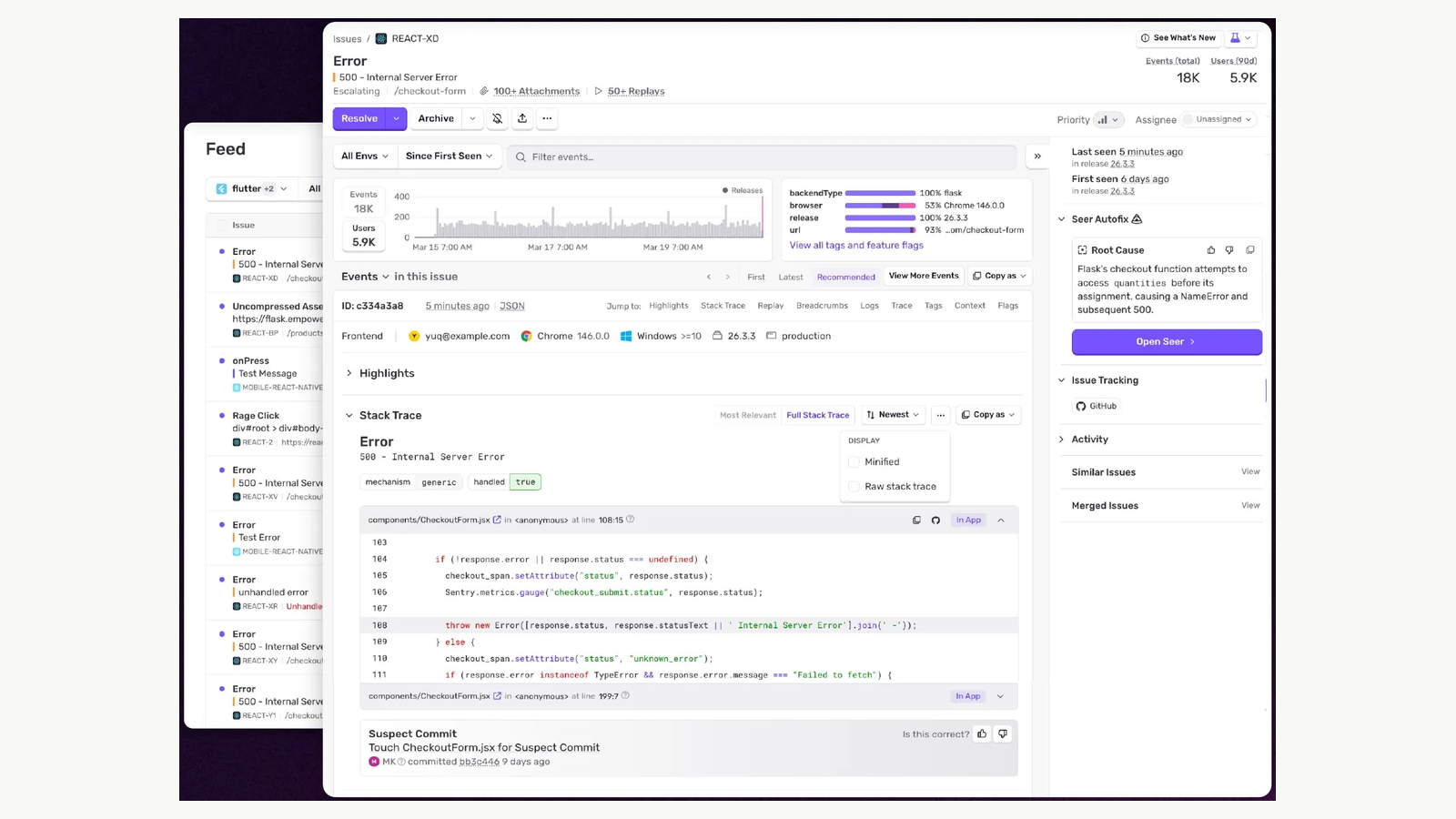
Sentry’s published issue view connects a failure with observable context and workflow actions. The counts shown belong to the product demonstration. Credit: Sentry.
For each state, write five things: the trigger, what the system knows, what the user needs to know, what action is safe next, and what must be preserved. This produces a compact interaction contract that design, engineering and QA can actually use.
Not all empty states are the same problem
One of the most common design-system mistakes is treating “empty state” as a single reusable layout with an illustration, a headline and a button.
Consider three situations that all display zero rows:
- First use: the person has never created a project. They need orientation and a first step.
- No results: the person searched for an existing project and the filters excluded everything. They need to understand which query produced zero matches and how to broaden it.
- No access: records exist, but this person cannot view them. They need an explanation of the access boundary and an appropriate request path.
Putting “Nothing here yet” on all three is misleading. Worse, putting “Create your first project” on a permissions problem can suggest that data has disappeared.
First-use blank slates and states after someone has cleared or completed work should be treated as different conditions. A useful design-system approach is to separate the visual shell from the state semantics: the same component may render different content and actions, but the product must supply the correct reason.

The empty canvas can hide three different conditions. These deliberately simple UI examples are hypothetical. Credit: Original editorial visual prepared for Andrea Mabellini.
I usually ask one diagnostic question: does the user expect something to be here? If not, explain the opportunity. If yes, explain the discrepancy. If the absence is intentional, confirm it without creating unnecessary urgency.
Design error messages around responsibility and recovery
An error message is useful only if it helps the person make a better next decision. “Something went wrong” is sometimes unavoidable when the system truly lacks information, but it should never be the default copy for a known condition.
Take a form that fails because the renewal date is earlier than the contract start date.
Weak: “Invalid date.”
Better: “Renewal date must be after 12 November 2026.”
Better still, when the relationship is important, show the relevant start date nearby and provide a date picker that prevents impossible selections without trapping keyboard users.
The GOV.UK Design System recommends field-specific messages, preserving previously entered answers and separating validation errors from service failures or permission problems. This distinction matters: a user should not be told to “correct the form” when the server is down.
Good recovery copy usually answers four questions:
- What happened? Name the affected action or field.
- What was affected? Was the save rejected? Was any work lost? Did the action partially complete?
- What can I do now? Edit, retry, request access, download a copy or contact support.
- What will the system do? Retry automatically, retain the draft, notify the user or wait for a decision.
Keep the language proportionate. A missing optional attachment should not look like a security incident. A failed transfer should not be disguised as a friendly toast that disappears before it can be read.

An interruption can state the condition clearly and still omit the next action. Physical service analogy. Credit: Tim Mossholder / Unsplash.
Preserve user effort as a product requirement
Teams often talk about error handling as a messaging problem. In practice, one of the largest sources of frustration is the system discarding work.
Imagine someone preparing a long insurance claim, entering ten fields, uploading evidence and reviewing a summary. Submission fails because the server rejects a postcode format. If the page reloads and clears the description, the problem is no longer the postcode. It is that the product has made the user repeat a substantial amount of work.
Research from Baymard Institute documents this issue in checkout, including the difficulties caused when sensitive payment fields are cleared after unrelated validation failures. The specific implementation of retaining payment data must respect security requirements; the broader UX principle is to protect user effort wherever it is safe and appropriate.
Preservation is more than leaving text in fields. It may include maintaining selected filters, the scroll position, an upload queue, expanded sections, draft attachments and the user’s place in a multistep process.
In enterprise software, I would write this as an explicit acceptance criterion: after a recoverable failure, all valid user work remains available and the user can resume from the point of interruption. Engineering can then discuss what is feasible for each data type instead of discovering the requirement in QA.
Loading is not one state
A spinner is a visual convention, not an explanation. “Loading” can mean the system is fetching information, validating a command, saving locally, synchronizing with a server or waiting for an external approval. Those operations have different consequences.
For example, consider an autosaving editor:
- Editing: the user has made changes that have not yet been submitted.
- Saving: a request is in progress; the interface should not imply completion.
- Saved: the server has acknowledged the relevant version.
- Save failed: the current changes are still available locally, but not confirmed remotely.
- Conflict: a newer version exists and the user must decide how to reconcile it.
These are materially different states. Showing “Saved” optimistically when the request is merely queued may be acceptable in some offline-first products, but only if the wording and behavior communicate that distinction. In a regulated or high-stakes workflow, a false success signal can be more damaging than a visible delay.

The published Stripe webhook example distinguishes a failed event from the next retry or manual resend action. Credit: Hookdeck / Stripe.
Ask engineering which transitions are observable, which are inferred and which can fail silently. Then write the UI contract against actual events rather than assuming every asynchronous action finishes immediately.
Permissions should explain the boundary, not pretend the page is empty
Permission problems are often mishandled because they cross organizational boundaries. Product design owns the interface; identity and access management owns the policy; engineering implements the enforcement. Without a shared decision, the UI can end up showing a disabled button with no explanation, or an empty list that conceals the existence of inaccessible records.
Start by separating three cases:
- The user lacks permission for a specific action but can still view the object.
- The user cannot view the object at all.
- The user’s permission changed during an active workflow.
These cases need different behavior. An edit button might be disabled with an explanation and a request-access path. A sensitive record might not be disclosed at all. A permission revoked mid-edit may require saving a local copy of unsent changes, while avoiding any implication that the user can still submit them.
Design must respect security constraints. The interface should provide the most useful explanation permitted by the policy, not leak information in the name of transparency.
Partial success is the missing enterprise pattern
Consumer examples tend to focus on one action: a payment fails, a message does not send, a form has an error. Enterprise products frequently perform actions on many records at once.
Suppose an operations manager selects 80 invoices and changes their status. Sixty-eight updates succeed, nine fail validation, and three are blocked by permissions.
What should the interface say?
“Success” is false. “Error” is also incomplete. A useful result state should communicate the counts, distinguish reasons, retain the selection or identifiers of affected records, and let the user retry only the failed items when that is safe.
A practical pattern is a result summary followed by a filterable list of exceptions: “68 updated. 12 need attention.” The user can inspect each group, export failures if necessary, and understand whether retrying risks duplicate actions.
This pattern belongs in a mature design system alongside tables, bulk actions and notifications. It is not an isolated one-off error page.
Prioritize by consequence, frequency and recoverability
Once the state inventory is complete, teams sometimes become overwhelmed. There may be dozens of plausible cases. Designing all of them with equal fidelity is not a sensible use of time.
I prioritize states using three questions:
- Consequence: if this state is handled poorly, can it cause financial loss, data loss, unsafe action, exclusion or a major task failure?
- Exposure: how often is this condition likely to occur, and how many users or workflows does it affect?
- Recoverability: can the user safely recover without support, re-entry or irreversible damage?
This is a decision framework, not a validated statistical formula. I deliberately avoid assigning pseudo-precise scores unless the team has evidence for them. A low-frequency but irreversible failure can deserve more attention than a frequent, harmless loading delay.
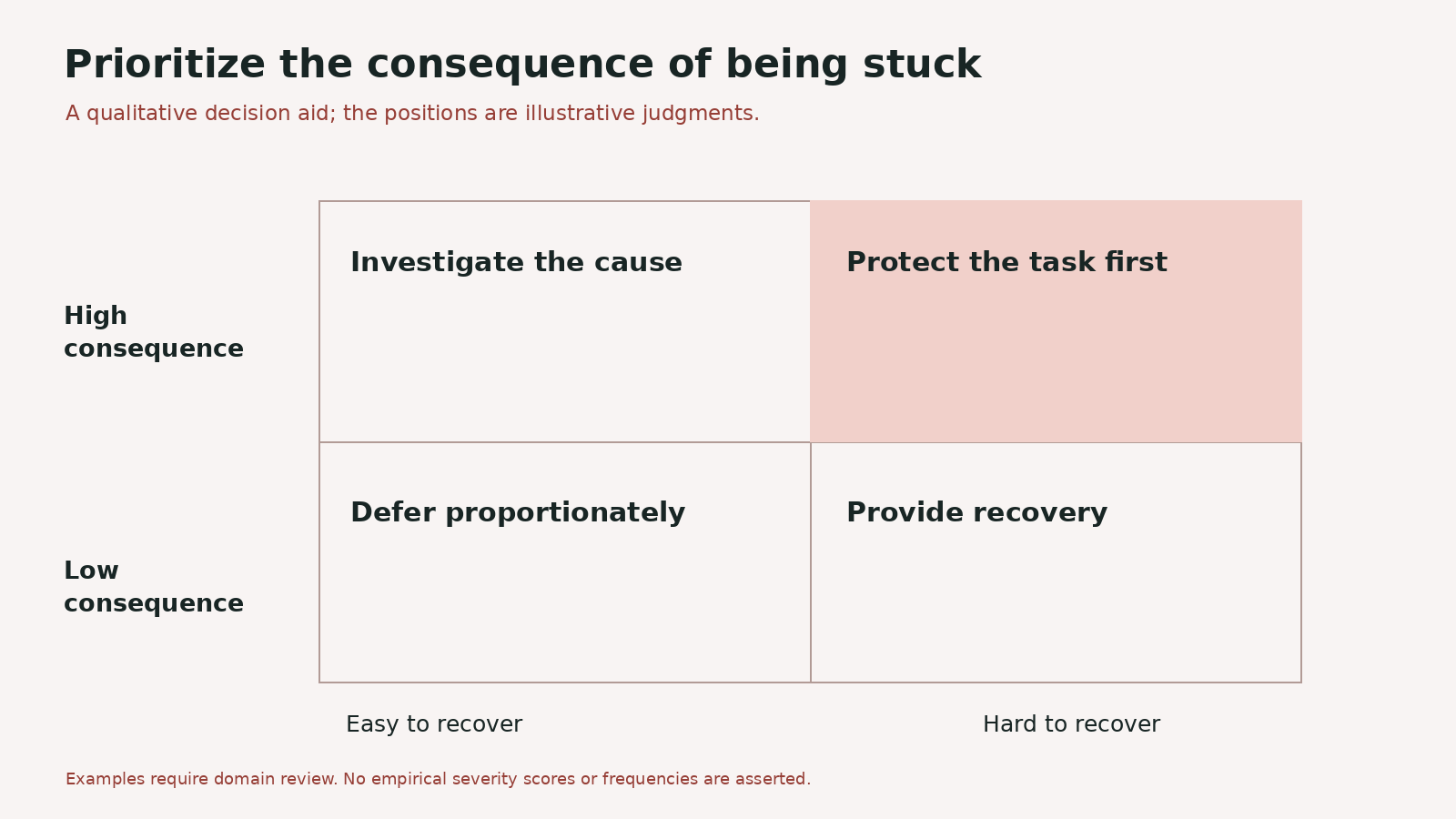
Potential consequence and recoverability help choose the next action. The matrix is a qualitative aid, not measured risk data. Credit: Original editorial visual prepared for Andrea Mabellini.
In a planning workshop, put each state on a simple consequence-versus-recoverability grid. Use exposure as a marker or annotation. The discussion matters more than the arithmetic: it forces product, design and engineering to make their assumptions explicit.
A five-step workshop you can run in 90 minutes
You do not need a separate initiative called “resilience design.” You can bring this work into the normal delivery cycle with a focused session.
Step 1 — Pick one consequential flow (10 minutes)
Choose a flow that matters: sending a proposal, approving a payment, changing permissions, submitting a healthcare record or performing a bulk update. Do not start with the entire product.
Step 2 — Map the happy path in five to eight actions (15 minutes)
Write only the user’s meaningful decisions and the system’s consequential responses. Avoid reproducing every click. Mark the points where data is written, an external service is called or another person is affected.
Step 3 — Generate the state inventory (20 minutes)
For each consequential point, ask: what if the data is absent, slow, stale, invalid, inaccessible or only partly processed? Bring an engineer and someone who understands support or operations. They will often name failures that are invisible in a design file.
Step 4 — Design the top three recoveries (30 minutes)
For each selected state, define the trigger, visible message, preserved data, safe next action and ownership. Sketch only the necessary UI. If the state requires an engineering decision, document the open question instead of inventing certainty.
Step 5 — Convert to acceptance criteria (15 minutes)
Write scenarios that QA can verify. For example: “Given the user has edited a draft, when the save request times out, the entered changes remain visible, the interface does not claim the draft is saved, and the user can retry without re-entering data.”
This workshop works because it connects design quality to implementation behavior. It does not end with a mood board of empty states.
What to put into the design system
Reusable components help, but a resilient design system needs more than a collection of alert colors.
I would document patterns with contracts: form validation, asynchronous save, first-use onboarding, no-results search, permission denial, bulk-action outcomes, conflict resolution and service unavailability.
Each pattern should include:
- When to use it: the underlying condition, not just the visual appearance.
- Required content: what the message must explain and which actions must be offered.
- Behavior: focus management, keyboard interaction, persistence, dismissal and retry rules.
- Variants: which differences are legitimate and which should remain consistent.
- Implementation guidance: events and API responses that should drive the state.
- Examples: at least one realistic, imperfect enterprise scenario.
This is especially important when teams use AI to generate UI. An agent may reproduce an Alert component perfectly while applying it to the wrong situation. A design system that explains state semantics and recovery behavior provides better context than a visual library alone.
Test recovery, not just completion
A usability test in which every task succeeds tells you little about recovery. Introduce controlled interruptions. Delay a response. Return no results. Change a permission. Make a save fail. Present a version conflict.
Then observe what participants actually understand:
- Can they tell whether the action happened?
- Can they identify what was affected?
- Do they know what to do next?
- Can they continue without losing work?
- Do they trust the confirmation, or do they repeat the action because they are unsure?
Be careful with testing language. A participant saying “I would just retry” does not prove retry is safe. The product must define whether the operation is idempotent and whether a duplicate request could create a second payment, notification or record.
Accessibility testing also matters. WCAG 2.2 success criteria on error identification and error suggestions require errors to be understandable in text and, where known and appropriate, accompanied by ways to correct them. A visually obvious red outline alone is not enough. Dynamic status changes also need the right semantics and focus behavior.
Measure the failures you can improve
Once the flow ships, instrument the states you designed. Useful measures may include validation-error frequency by field, retry success, failed-save recovery, time spent in a permission-blocked state, bulk-action partial-success rates and support contacts after specific failures.
Interpret those metrics carefully. A high validation-error rate can indicate a confusing field, but it can also reflect a legitimately complex rule or a user population with unusual inputs. The metric identifies a question; research and product context explain it.
For a design-system team, repeated failure patterns are also a signal. If several products implement different versions of the same timeout recovery, the opportunity may be a shared pattern rather than another local patch.
The real definition of a finished flow
I do not expect every exploratory prototype to include every edge case. I do expect teams to know which cases they are intentionally deferring and why.
When reviewing a flow before implementation, I ask for three things: a clear happy path, a state inventory for consequential moments, and a recovery contract for the failures that matter most. That is usually enough to expose major gaps without slowing the team into exhaustive documentation.
Designing the happy path is how we show that an experience could work. Designing its interruptions is how we make it dependable.
And in complex products, dependability is not an edge case. It is the product.
Related reading: design-to-code workflows that preserve real interaction states; how to design trustworthy recovery in agentic products; why design systems need behavioral rules for AI; the invisible work of a UX lead.