When creating an interface becomes easier, deciding whether an interface is needed becomes more valuable. A team can now turn a feature request into a plausible prototype before it has examined the request’s underlying cause. The senior designer’s contribution may be to slow that particular commitment long enough to ask a better question.
This is not an argument for less care or less ambition. It is an argument for directing design effort toward the intervention that changes the user’s situation. Sometimes that intervention is a new flow. Sometimes it is a clearer policy, more reliable data, an existing component used correctly or the removal of an unnecessary step.
Knowing what not to design requires judgment because declining a feature can also be wrong. A missing interface can leave users dependent on support or exclude people from a task. The aim is not to minimize screens at any cost. It is to make the decision to add them accountable to evidence, consequences and alternatives.
This extends the leadership perspective in my article on value beyond the screen with a specific discipline: deciding whether a requested interface is the right intervention at all.
The examples in this article are hypothetical product situations. They describe how I would approach scope decisions, not undocumented client outcomes. The practical framework is intended for teams that need to move quickly while avoiding unnecessary complexity.

Before opening a design file, define the task and whether another screen is needed. Context photograph. Credit: Kelly Sikkema / Unsplash.
Start with the work the request is trying to change
A request usually arrives in solution language: add a dashboard, build a wizard, provide an AI assistant or redesign the settings area. That language can be useful, but it should not be the only representation of the problem.
Consider a hypothetical operations team requesting a dashboard of stalled approvals. Before drawing cards and charts, ask who needs to act, what counts as stalled and what prevents the action today. The issue may be that nobody owns requests after an approver leaves the organization. A dashboard could display the problem without resolving it.
Translate the request into a situation and outcome: “An operations lead needs to identify requests without an available approver and assign a valid replacement.” This statement makes several interventions possible. It also reveals policy and authorization questions that an interface alone cannot settle.
Keep the original request in the discussion. Stakeholders may have proposed it because they understand an important constraint. Reframing should invite that knowledge rather than dismiss it. Senior judgment includes discovering when the requested solution is appropriate, not proving that every request should be challenged.
Distinguish interface problems from surrounding causes
I would examine five possible causes: missing information, unclear rules, insufficient authority, unreliable system behavior and difficult interaction. They can coexist. The purpose is to identify what must change for the task to become possible.
If people cannot determine which record is current because two systems disagree, an improved layout may help expose the conflict but cannot establish authority. If users understand the task but lack permission, onboarding is not the primary fix. If they have the information and authority but cannot operate the controls, interaction design deserves direct attention.
This distinction is particularly important in enterprise products, where design can become the visible destination for invisible organizational problems. A confusing workflow may reflect unclear responsibility across departments. The interface should communicate the agreed responsibility, but the organization must agree it first.
Document the dependency. “The proposed reassignment flow requires a policy defining who can select a replacement approver” is a concrete design finding. It allows the team to proceed with the right owner involved rather than generating screens that imply a decision nobody has made.

Basecamp’s published Hilltop View makes uncertainty part of project conversation rather than treating every item as a production task. Credit: 37signals / Basecamp.
Reuse is a product decision, not a visual compromise
Before creating a new pattern, investigate whether an existing one solves the task. Reuse can reduce learning cost, implementation effort and long-term maintenance. But a component that looks close is not automatically a suitable solution.
For the approval example, a standard table with filtering and a clear action may be enough. A custom board may improve scanning in some contexts but add drag-and-drop behavior, accessibility requirements and a new mental model. The trade-off should be explicit rather than justified by novelty.
Inspect the existing pattern’s contract. Does it support the necessary selection scope, permissions and result states? If not, an extension may be more appropriate than either forcing the task into the component or creating a parallel solution. The system team can help distinguish a shared gap from a domain-specific exception.
The same principle applies when AI produces a bespoke interface quickly. Generation time is only one cost. Someone will maintain the behavior, document it, test changes and support users. A custom solution should earn that ongoing commitment through a clear task benefit.
Ask whether the task should exist at all
Some interactions are difficult because the product asks users to perform work the system could avoid. A designer may spend days improving a repeated reconciliation step when the better intervention is to stop generating inconsistent records upstream.
For a hypothetical document intake flow, users might manually rename files because the system discards metadata. A bulk-renaming interface can improve the workaround. Preserving the original metadata may remove the need for it. Both options need technical evaluation, but the second should be considered before the first becomes a roadmap commitment.
Be cautious about removing work that serves a purpose. A review step may catch errors, support accountability or satisfy a domain requirement. Ask what control the step provides and whether an alternative preserves that function. “Fewer clicks” is not a sufficient reason to eliminate an important check.
The GOV.UK check-answers pattern is a useful example of a deliberately included review opportunity. The product question is whether the review helps users identify and correct consequential information, not whether it makes the flow shorter.

A screen is part of a larger service. The cause of an obstacle may lie in one of the surrounding dependencies. Credit: Original editorial visual prepared for Andrea Mabellini.
Prefer the smallest intervention that addresses the cause
Minimal scope should describe the intervention’s sufficiency, not its visual size. A small label change may be enough when terminology is the cause. It is insufficient when the label conceals a false system state. A large-looking feature can still be the smallest responsible solution if the task requires it.
For stalled approvals, the smallest effective intervention might combine a clear owner, a reassignment action and a durable result. A complete monitoring dashboard could wait. But if the operations lead must compare many requests regularly, a cross-request view may be essential rather than decorative.
Write down what the intervention must accomplish and what it intentionally leaves unresolved. This helps the team avoid quietly expanding a local fix into a broad redesign. It also prevents stakeholders from interpreting the reduced scope as a promise to solve every related problem.
Use a pilot when the change is reversible and its boundaries can be maintained. Define who receives it, what will be observed and what would justify expansion. A limited release is a learning strategy only if the team is prepared to change the direction based on what it discovers.
Design restraint needs evidence
“We do not need this” is a strong claim. Support it as carefully as a proposal to build. Existing behavior may already solve the task, but verify that it works for the affected roles and contexts. Internal familiarity can make an awkward workaround look acceptable.
Observe the current task where possible. Ask people what they do when the expected information is absent, what they repeat and where they seek help. Examine operational evidence with its limitations. A lack of support tickets does not establish that a flow is usable; people may abandon it or rely on colleagues instead.
If evidence is weak, choose investigation rather than confident rejection. The GOV.UK research-planning guidance offers a useful reference for converting assumptions into questions. The decision here is whether a new interface is the right intervention, so the research should be able to challenge that direction.
Make the decision visible to stakeholders
A senior designer should not leave a rejected request as an unexplained absence. Record the original problem, considered options, available evidence, decision and condition for reconsideration. This creates an accountable alternative to both silent refusal and automatic compliance.
For the approval dashboard, the decision might be: defer the dashboard, establish replacement authority and pilot a reassignment action in the existing list. Reconsider a dedicated overview if operational observation shows the list cannot support regular monitoring. This is a positive plan with a review trigger.
Explain the trade-off in the stakeholder’s terms. The organization wants approvals to progress, not merely a dashboard to exist. Show how the proposed intervention addresses that outcome and which risks remain. Avoid presenting restraint as a matter of designer taste or hostility to the requested feature.

More signals can increase competing demands on attention. Street-scene analogy; it does not establish a measured usability outcome. Credit: Haydn / Unsplash.
Do not turn simplification into exclusion
Reducing visible complexity can move the burden onto users. Removing labels, hiding advanced controls or forcing everything through chat may make the interface look simpler while making the task harder for people with different needs.
Check who loses capability when scope is reduced. Does an expert user need access to detailed records? Does a keyboard user need a predictable action path? Does an occasional user need clearer explanation? The smallest appropriate intervention must preserve the task for the relevant groups.
Progressive disclosure can be useful, but it should follow information needs rather than visual preference. If a detail is necessary to make a safe decision, hiding it behind a secondary action may be harmful. If it is rarely needed and reliably discoverable, moving it may improve focus.
In consequential workflows, error prevention and recovery remain part of scope. The W3C guidance on error prevention is relevant when users commit important changes. A restrained design should not achieve its brevity by removing necessary review or correction routes.
Know when a new interface is justified
Restraint is not a default veto. A new interface may be justified when the current product cannot support a recurring task, when a new role needs a distinct view or when combining scattered information materially improves a consequential decision.
For example, if operations leads routinely compare stalled approvals across departments and must distinguish ownership, age and policy exceptions, an overview could be the right intervention. The earlier diagnosis helps define its content and actions. It prevents the dashboard from becoming a generic collection of charts.
The decision should connect three things: demonstrated need, a plausible mechanism of improvement and an operating plan. Who will use it? How will it change the task? Who will maintain the data, behavior and support path? Without the third answer, even a useful concept may become another fragile destination.
Keep exploration separate from commitment
It can be reasonable to prototype an idea before the evidence is complete. The danger is allowing the prototype’s polish to imply a commitment. Label exploratory work by the question it investigates and state what has not been validated.
Compare alternatives that represent different interventions. A new dashboard, an improved existing list and an ownership-policy change are more useful strategic alternatives than three card layouts. The latter can help refine a chosen direction, but they do not test whether that direction is necessary.
After review, record whether the team will build, adapt, investigate or stop. This makes stopping a legitimate outcome of exploration. If every concept automatically generates another version, rapid prototyping becomes a mechanism for increasing scope rather than improving decisions.
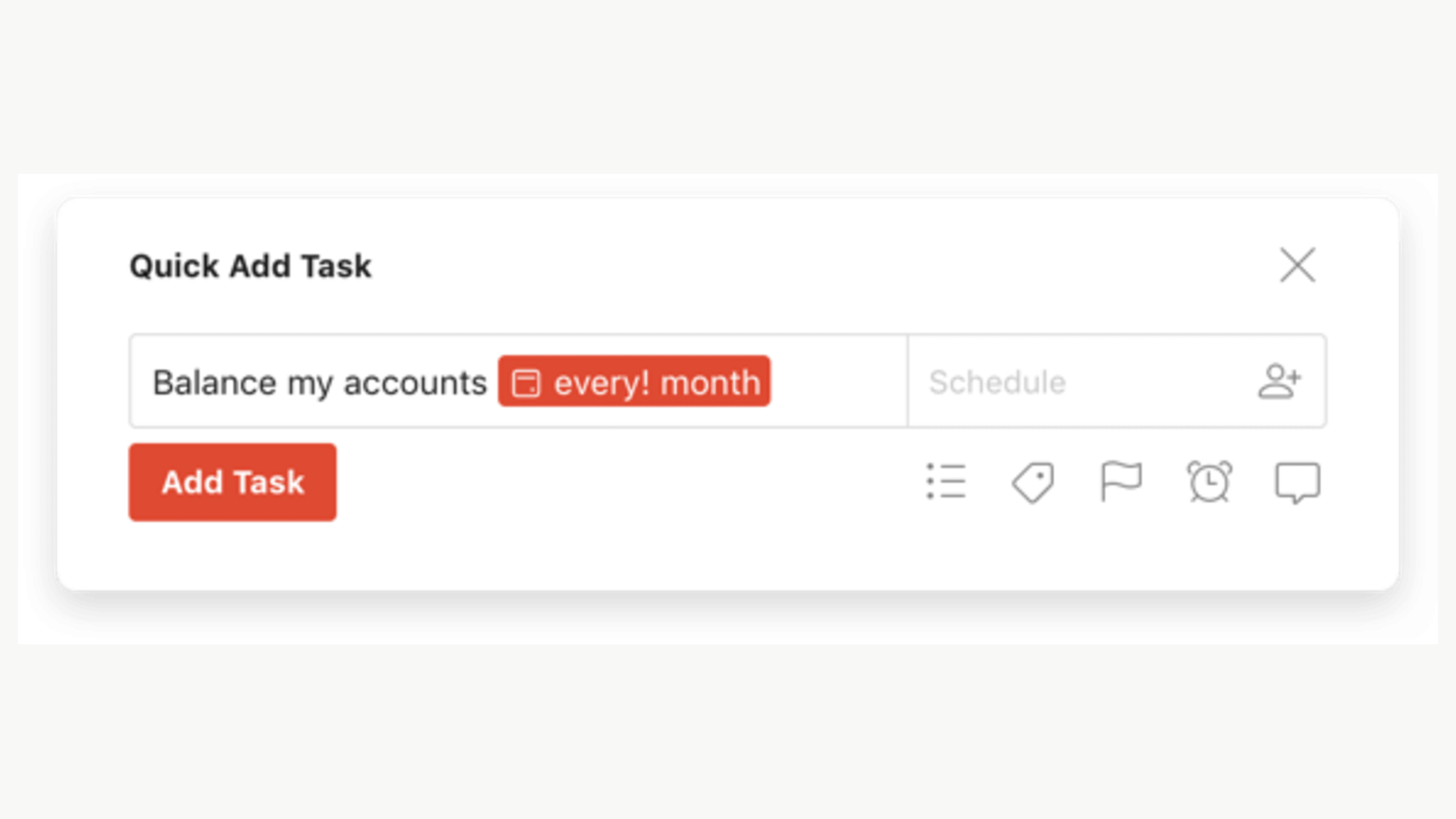
Todoist’s published Quick Add example expresses a recurring rule in the task entry, illustrating a compact intervention. Credit: Todoist.
Account for the maintenance you are creating
Every feature adds obligations beyond initial delivery. Consider documentation, analytics, accessibility, localization, support, integration behavior and migration when the underlying system changes. These costs do not make new work undesirable; they make the choice consequential.
A quick custom approval dashboard may depend on status definitions that differ across products. Maintaining the view then requires reconciling those meanings. The visible interface can be simple while its ongoing coordination cost is substantial. Expose that dependency during planning.
Ask engineering and operations to describe the likely maintenance boundaries. Which part reuses a supported service? Which part introduces a new integration? Which team handles failures? A designer need not estimate every technical task to recognize that a generated interface has created an ownership problem.
This is where design-system reuse becomes strategically useful. The Figma Code Connect documentation describes a technical route for connecting design components to production code. My related design-to-code article explores that context. These connections can reduce reinvention, but they do not decide whether the product should add another feature.
A scope review you can run before drawing
Bring the requester, product, design and engineering into a short review. State the user situation and desired outcome. List the cause you believe is preventing the outcome, the evidence for that cause and at least one intervention that does not require a new destination.
Then ask what must be true for each option to work. Identify policy, data and technical dependencies. Choose the smallest investigation or implementation that can responsibly move the decision forward. Record what would change the choice later.
Use the review for consequential proposals rather than every minor UI change. The purpose is to improve judgment where the commitment is meaningful, not to make the normal use of a button component require a strategy meeting. Proportionality is part of senior practice.
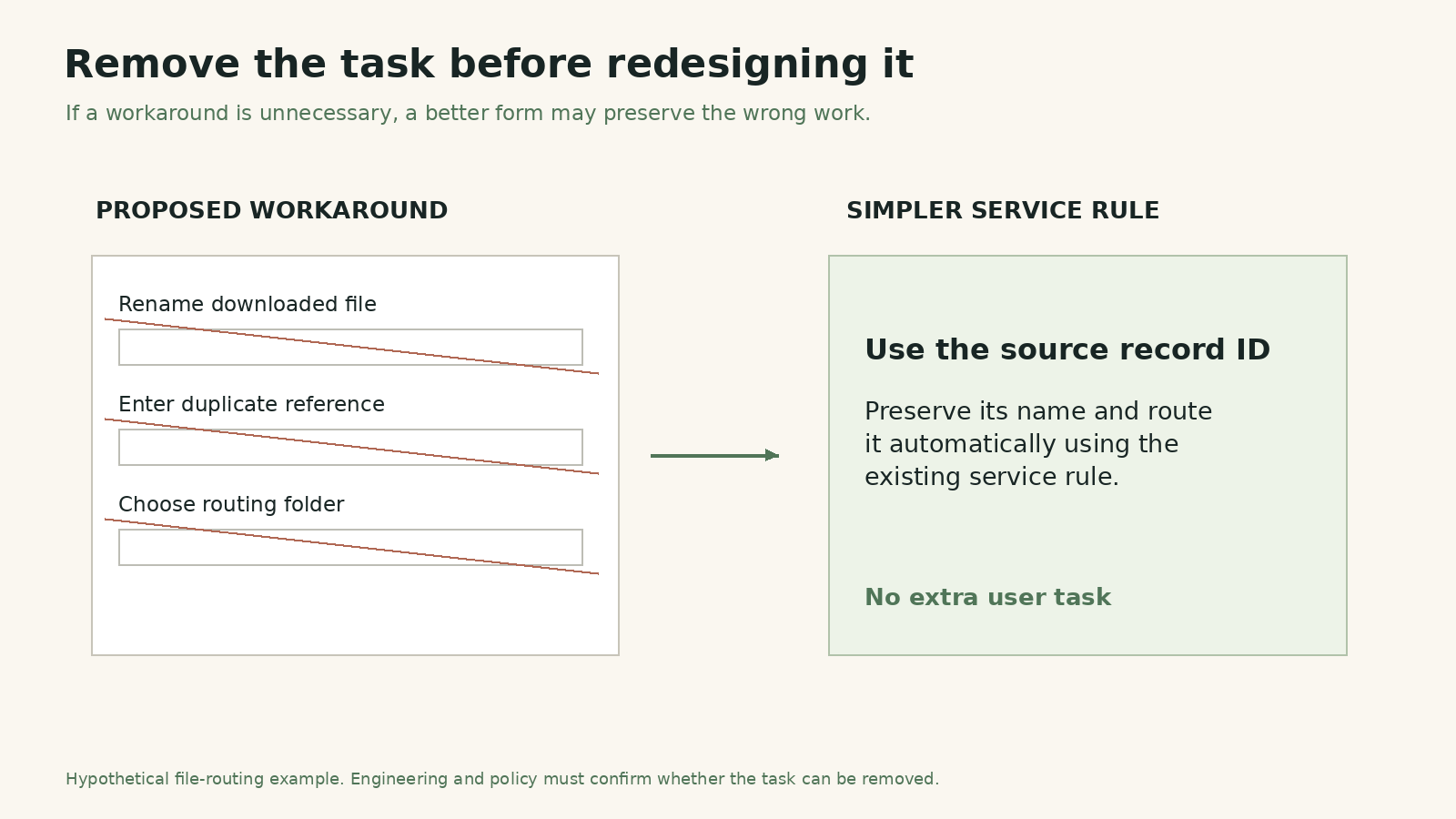
The useful intervention may remove work rather than add a screen. The file-routing example is hypothetical. Credit: Original editorial visual prepared for Andrea Mabellini.
The contribution can be an absence with a reason
Some of the most valuable design work leaves no new screen behind. A redundant step disappears. A policy becomes clear. An existing pattern gains the missing state. A speculative feature waits until the team understands the task it is meant to improve.
Those outcomes can be difficult to present in a portfolio or status update, so explain the decision and its evidence. Do not invent savings or claim an avoided failure that cannot be demonstrated. Describe the unnecessary commitment the team chose not to make and the practical work it did instead.
As production becomes cheaper, professional value shifts toward selecting and shaping the right work. Knowing what not to design is not a retreat from craft. It is the judgment that allows craft to matter where it can change the product most.