Most of the first generation of AI products borrowed an interface we already understood: chat. Type a request, receive an answer. The interaction was familiar enough that designers could reuse decades of messaging conventions.
Agents break that model.
An agent does not merely tell you what it would do. It can search, decide, modify files, contact systems, schedule work, create artifacts, execute code, or trigger other tools. Once software begins acting on behalf of a person, the core UX problem changes from conversation design to delegation design.
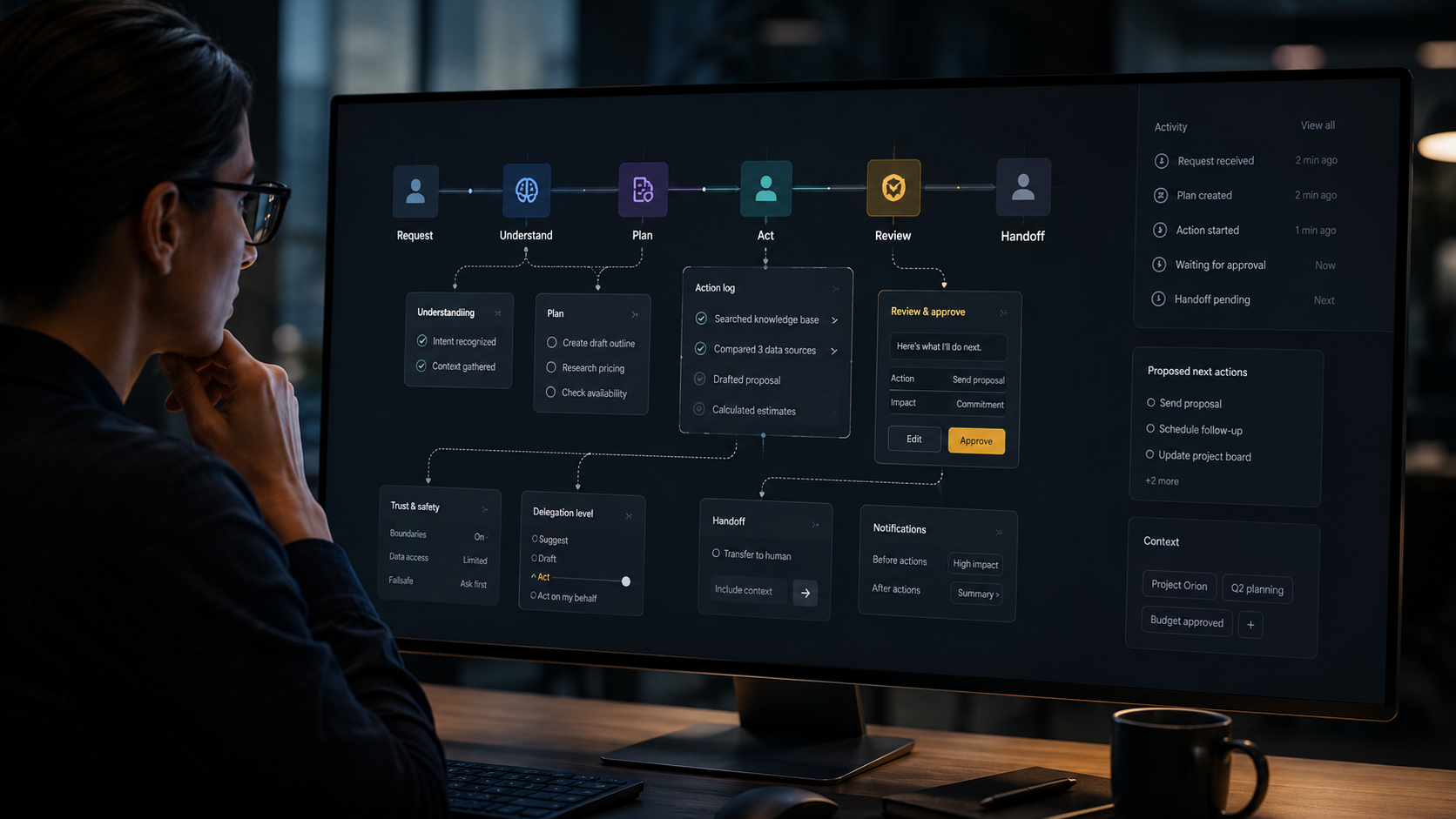
The interface has to communicate what the system understood, what it plans to do, what it is allowed to do, what it already did, where uncertainty exists, and how the user can recover if something goes wrong.
We have patterns for buttons, forms, progress bars and notifications. We have fewer mature patterns for autonomy.
1. Intent confirmation should be proportional to consequence
Traditional interfaces often ask for confirmation at the moment of execution: “Are you sure?” In agentic systems that is too late and too generic.
The agent needs to make its interpretation of intent visible before meaningful action begins.
For a low-risk action, that may be a subtle summary: “I’ll rename these 42 layers using your component naming rules.” For a high-risk action it should be richer: “I’ll email the proposal to these three recipients, attach the current pricing PDF, and schedule a follow-up for Friday.”
The key principle is consequence-sensitive confirmation. Users should not be interrupted for reversible trivial actions, but they should not discover the agent’s interpretation only after an irreversible action.
2. Plans are interface objects
When an agent needs multiple steps, the plan should not remain hidden in model reasoning. It should become an inspectable interface object.
A good plan view answers:
- What is the goal?
- What steps are proposed?
- Which steps require external access?
- Which steps are reversible?
- Where will the agent pause for approval?
- What assumptions is it making?
This is more useful than a streaming paragraph of “thinking.” Users need a model of the action, not a transcript of computation.
3. Delegation needs levels, not a binary switch
“AI on” and “AI off” are crude controls. In practice, users want different levels of delegation depending on the task.
A useful spectrum is:
- Suggest: recommend an action.
- Draft: prepare the action but do not execute it.
- Act with approval: execute after explicit confirmation.
- Act within boundaries: execute automatically when predefined conditions are met.
- Act autonomously: pursue the goal and report outcomes.
This can be expressed globally, per workflow, or even per step. The important thing is that users understand how much authority they have delegated.
4. Boundaries should be visible before errors happen
Permissions dialogs are usually technical: access files, use camera, read contacts. Agents need semantic boundaries as well.
Examples:
- Never spend more than €200 without approval.
- Draft external emails, but do not send them.
- You may modify components in the experimental library, never the production library.
- Use customer data only from the approved research repository.
These rules should be represented as user-understandable controls, not buried in a prompt or policy document.
5. The action log becomes part of trust
In conventional software, users often do not need to know how the system produced a result. In agentic software, provenance matters because the system may have touched several tools.
An action log should show meaningful events: “searched the knowledge base,” “compared three suppliers,” “created a draft,” “changed 12 records.” It should not overwhelm the user with API calls.
The design challenge is summarization: enough transparency to establish accountability without turning the product into a developer console.
6. Uncertainty needs a visual language
AI interfaces still overuse confidence theater. A polished answer appears visually identical whether the model had strong evidence or guessed.
Designers need better patterns for uncertainty: missing inputs, conflicting evidence, low-confidence matches, ambiguous intent, and assumptions that materially affect the result.
Not every uncertainty needs a percentage. Often a simple statement is more useful: “I found two possible customer accounts with this name. Choose one before I update the record.”
The point is not to make AI look hesitant. It is to make uncertainty actionable.
7. Recovery must be designed at the action level
Undo is easy when the user moved an object. It is harder when an agent has updated a CRM, sent a message, created a calendar event and changed a document.
Agentic UX needs to distinguish between:
- fully reversible actions;
- partially reversible actions;
- irreversible actions;
- actions whose side effects cannot be reliably known.
Before a consequential workflow runs, the interface should know which category each step belongs to. After execution, recovery options should be specific: restore previous values, cancel scheduled event, draft correction message, recreate deleted object, or escalate to a human.
8. Handoff to humans should carry context
“Talk to a person” is not enough. If an agent gets stuck after fifteen steps, the human should not restart from zero.
A good handoff package includes the original goal, what the agent understood, what it attempted, evidence collected, actions completed, unresolved blockers and the next decision required.
This is particularly important in service design. The boundary between automated and human service is itself a user journey, and the quality of that transition often matters more than whether the agent could finish autonomously.
9. Notifications should report exceptions, not activity
An autonomous system can create notification spam very quickly. “I started.” “I searched.” “I finished step 2.” “I’m now doing step 3.” That is not transparency; it is interruption.
Users usually need notifications for:
- approval required;
- meaningful exception;
- risk or constraint encountered;
- goal completed;
- material deviation from the agreed plan.
Everything else belongs in the activity log.
10. The agent should expose its operating context
One of the hidden sources of bad AI behavior is stale or inappropriate context. The interface should help users understand what sources the agent is using.
A simple context panel could show: project, connected systems, active policies, files included, date range and relevant user preferences.
This also makes correction easier. Instead of saying “the AI is wrong,” the user can see that it used the Q1 price list instead of the Q3 one.
A practical design framework
When designing an agentic workflow, I now find it useful to map six layers:
- Intent: what does the user actually want?
- Plan: how will the system pursue it?
- Authority: what may it do without asking?
- Evidence: what context and sources support its actions?
- Control: where can the user inspect, pause, edit or approve?
- Recovery: what happens when the action is wrong?
If one of those layers is missing, the experience may still demo well, but it will become fragile in real use.
Designing autonomy is not designing a chatbot
The most important mistake teams can make is to add agency behind a conversational interface and assume the UX problem is solved.
Chat can be one input modality. It is not the architecture of trust.
As AI becomes capable of acting across products and services, product design will need a richer grammar: plans, scopes, approvals, boundaries, logs, reversible actions, exception handling and human handoffs.
These patterns may become as ordinary as modal dialogs and navigation bars. We are simply early enough that the grammar is still being invented.
A concrete example: an agent that prepares a sales proposal
Consider a B2B agent that receives the instruction: “Prepare a renewal proposal for Acme and send it when ready.” A chat-only design might respond with a paragraph and then execute. A more mature agentic interface decomposes the experience.
First, it shows the interpreted goal: renew the existing plan for twelve months, apply the current enterprise pricing policy, include the usage summary and send the proposal to the two commercial contacts on file. The user can correct that interpretation before anything happens.
Second, the plan becomes visible: retrieve contract, check current price book, calculate renewal, generate document, review recipients, send. The system marks which steps are automatic and which require approval.
Third, the user sees boundaries: the agent can read CRM and billing data, draft documents and create tasks, but sending external email requires approval. That is not a privacy notice. It is part of the product model.
Finally, after the proposal is prepared, the interface shows evidence and exceptions: the pricing table used, the last contract date, one missing customer field and the exact email draft. Approval is now informed.
How to prototype an agentic experience
When prototyping, avoid building a perfect conversational simulation. Instead, prototype the control surfaces.
- Create the initial request state.
- Show the interpreted intent.
- Show a plan with 4–6 meaningful steps.
- Add one ambiguity that forces clarification.
- Add one high-impact approval.
- Add an action log.
- Add an error that requires recovery or handoff.
Test whether users can answer four questions at any moment: What is the system doing? Why is it doing that? What will happen next? How do I stop or correct it?
What to observe in usability testing
Traditional task success is not enough. Agentic products need additional behavioral signals.
- Do users understand what has already happened versus what is proposed?
- Do they notice high-impact approvals?
- Can they predict when the agent will ask permission?
- Do they understand the consequences of changing delegation level?
- Can they recover from a wrong assumption without restarting?
- Do they inspect sources when the decision matters?
- Do they over-trust confident language?
These observations reveal calibration, not just usability.
Pattern: preview before commitment
For externally visible or expensive actions, preview is a powerful trust mechanism. A generated email, payment, booking, deletion or account change should often have a review state that resembles the final outcome closely enough to make consequences obvious.
The preview should not become another form the user must re-author. The agent should do the work; the user should be able to verify the critical parts quickly.
Pattern: scoped autonomy
Users rarely want an agent to be universally autonomous. They want autonomy inside a known envelope.
Examples include “reorder supplies under €100,” “reschedule internal meetings but never customer meetings,” or “fix design-system violations on experimental pages only.”
Scoped autonomy is easier to trust because the user can understand the boundary. It also makes error handling more tractable.
Pattern: visible exceptions
Agents should not make the happy path louder than the exceptional path. Once the user has delegated a workflow, the interface should be quiet unless something materially changes.
An exception view might say: “The renewal is ready, but the customer’s billing country conflicts with the contract. Choose which record is correct.” The user is brought in exactly where judgment is required.
Pattern: confidence without fake precision
A numerical confidence score often creates false authority. “82% confident” sounds scientific even when the number is not meaningful to the user.
Prefer interpretable uncertainty: “Two records match,” “the policy was updated yesterday,” “I could not verify this address,” or “these sources disagree.” Give users something they can act on.
Pattern: progressive disclosure for agency
Most users should not see a control panel with twenty autonomy settings on day one. Start with a simple default and reveal more granular controls when the workflow requires them.
As the relationship matures, the product can let the user establish reusable rules. Trust becomes partly learned behavior: the user sees how the system behaves, then chooses to delegate more.
The design-system implication
Agentic patterns will eventually need design-system primitives. Teams should not reinvent approval cards, activity logs, source indicators, agent states and handoff patterns in every feature.
I would start documenting semantic components such as Agent Plan, Pending Approval, Action Result, Source Reference, Delegation Control, Exception State and Human Handoff. The visual form can evolve; the interaction contract should become consistent.
Why this matters now
As MCP connections and agent capabilities make it easier for AI to act across tools, the cost of poor interaction design rises. A confusing chatbot is annoying. A confusing agent with write access is consequential.
The products that feel trustworthy will not necessarily be the ones with the smartest models. They will be the ones that make autonomy understandable.
Practical review pass 1: turning the workflow into a team habit
Before adopting this workflow in a real product team, run one final review. What problem is this solving? Which part of the output comes from evidence and which part comes from generation? What system or guideline should constrain the result? Who is accountable for the final decision? What could go wrong if the output is confidently wrong?
Then review the artifact with the people who will live with the consequence. Designers should inspect interaction quality and consistency. Researchers should protect evidence quality. Engineers should review technical implications. Product managers should confirm that the work still addresses the intended outcome. AI can compress the path between these disciplines, but it should not erase their different forms of expertise.
Finally, document what worked. If a prompt, setup or sequence repeatedly saves time, turn it into a reusable team workflow. If it repeatedly creates cleanup, stop using it. The goal is not maximum AI usage. The goal is a better product-development system.
Practical review pass 2: turning the workflow into a team habit
Before adopting this workflow in a real product team, run one final review. What problem is this solving? Which part of the output comes from evidence and which part comes from generation? What system or guideline should constrain the result? Who is accountable for the final decision? What could go wrong if the output is confidently wrong?
Then review the artifact with the people who will live with the consequence. Designers should inspect interaction quality and consistency. Researchers should protect evidence quality. Engineers should review technical implications. Product managers should confirm that the work still addresses the intended outcome. AI can compress the path between these disciplines, but it should not erase their different forms of expertise.
Finally, document what worked. If a prompt, setup or sequence repeatedly saves time, turn it into a reusable team workflow. If it repeatedly creates cleanup, stop using it. The goal is not maximum AI usage. The goal is a better product-development system.