A complex enterprise product rarely has one obvious usability problem. It has roles with different permissions, workflows that cross teams, data that arrives from other systems and years of local compromises. A screenshot review can identify inconsistencies while missing the reasons users struggle to finish their work.
A five-day audit is useful because it forces focus. It is also easy to oversell. Five days cannot establish a complete understanding of every workflow, certify accessibility or replace sustained research. What it can produce is a defensible map of the most consequential friction, the evidence behind it and the next decisions the organization should make.
I would frame the engagement as a bounded diagnostic. The deliverable is not a promise that the product is now understood. It is a prioritized set of findings with clear scope, confidence and ownership. The schedule below assumes access, stakeholders and research permissions are arranged before the week begins. Recruitment delays do not disappear because the project has a short title.
The running example is a hypothetical operations platform used to review supplier records and approve changes. It combines dense information, delegated authority and asynchronous processing. None of the examples or quantities describes a real client engagement.

An audit must consider the ways people actually access the service; visual inspection alone is insufficient. Credit: Compagnons (Sigmund) / Unsplash.
Before day one: agree the question and access
Start by choosing the decision the audit will inform. Is the organization planning a redesign, investigating support demand or deciding where to invest in a fragmented product? An audit aimed at visual consistency needs a different sample from one examining failed approvals.
Ask for a role matrix, a safe environment, representative records, existing research, support categories and available analytics. Confirm which recordings and screenshots are allowed and how sensitive information will be handled. Where production access is inappropriate, ask for realistic test data and document the limitations it creates.
Arrange stakeholder sessions and any user observation in advance. A product manager, engineer and support or operations representative usually provide different parts of the picture. User access is especially valuable, but a week without it must be described as an expert assessment with indirect evidence, not a validated account of user behavior.
Make the scope visible in the opening brief: roles included, workflows sampled, platform versions reviewed and excluded areas. This protects the usefulness of the eventual recommendations. A finding from an administrator workflow should not silently become a claim about every person who uses the product.
Day one: map the work rather than the navigation
On the first day, build a task map. Navigation tells you where the product puts things. A task map tells you what people are trying to accomplish, what starts the work and how they know it is complete. The two often reveal different structures.
For the supplier platform, a meaningful task might be “review a proposed bank-detail change and release it for processing.” Its steps include finding the request, checking evidence, resolving exceptions, obtaining approval and verifying the result. The process may involve email or another system; those boundaries belong on the map.
Walk through the task with someone who knows the domain. Ask what changes for an experienced reviewer, a new reviewer and a person with limited authority. Ask where users pause, export data, contact a colleague or repeat checks. Those workarounds are clues, not automatic evidence that the interface should absorb every activity.
Select a small number of workflows using consequence, exposure and strategic relevance. Record why they were selected. A common read-only lookup and a rare irreversible approval may both deserve attention for different reasons. Avoid covering dozens of screens shallowly just to make the scope look large.
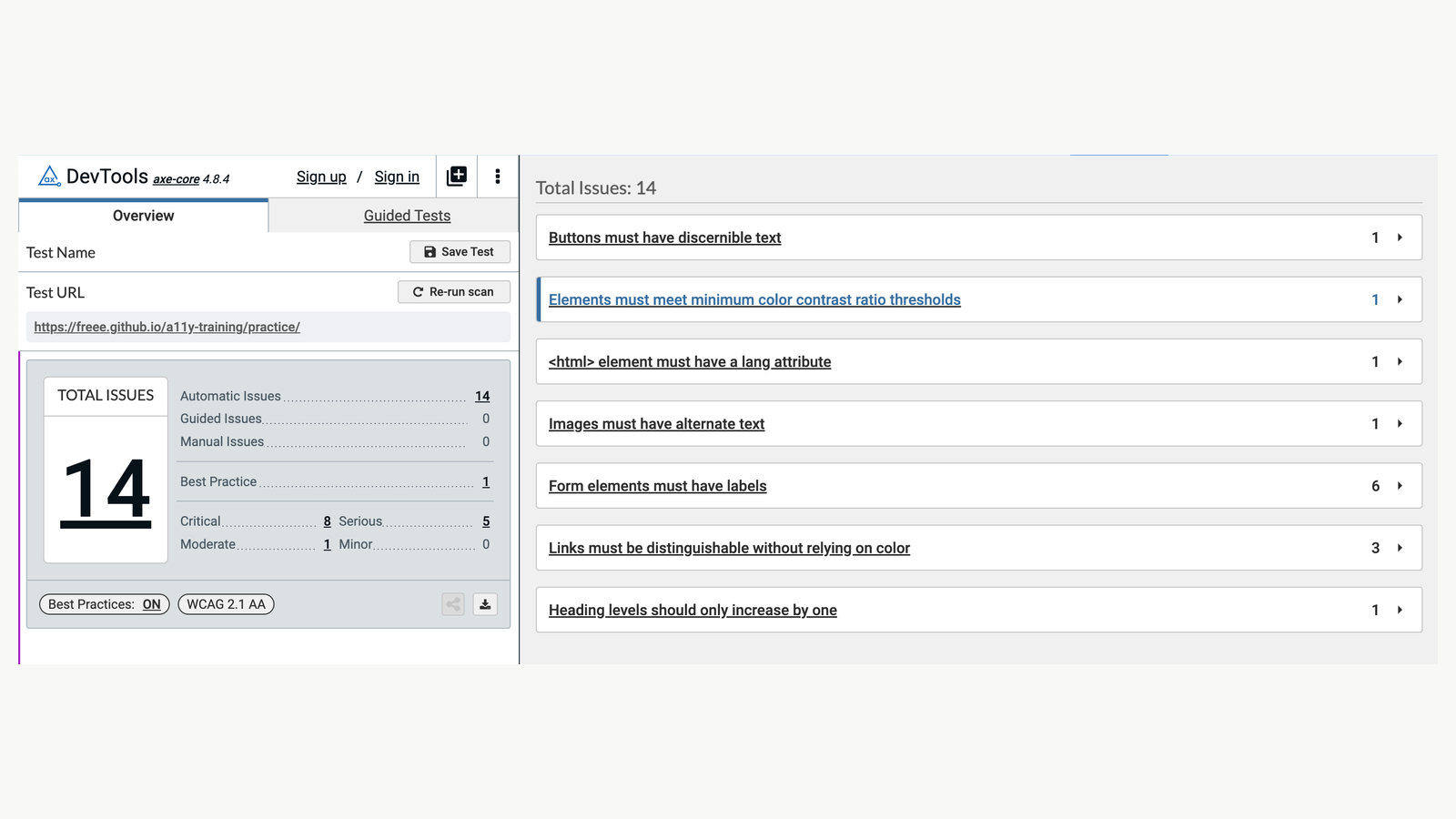
A published axe scan demonstrates tool-generated findings. Automated checks cover only part of an accessibility review. Credit: freee Accessibility Guidelines / axe DevTools.
Day two: inspect complete tasks and their interruptions
Use the second day to inspect the selected workflows systematically. Move through each task with representative data and role permissions. Capture the state, the user’s likely expectation and the obstacle. A screenshot without a task explanation is weak evidence.
Review information hierarchy, terminology, navigation, feedback, input requirements and recovery. Then interrupt the happy path: remove a document, use an expired session, introduce a validation conflict or examine partial processing where the environment allows it. Coordinate with engineering so the audit does not create unsafe actions or misrepresent behavior the test system cannot reproduce.
For a dense review screen, the issue may not be that there are too many columns. It may be that the columns needed for the approval decision are separated from the evidence, or that status meanings differ between the list and detail view. The recommendation should address that mechanism rather than defaulting to simplification.
Keep an evidence log as you work. Each entry should contain a finding identifier, role, task, trigger, observed behavior, expected behavior, consequence and source. Add a reproduction path where possible. This allows someone else to challenge the finding without repeating the whole audit.
Include accessibility as a scoped investigation
Accessibility belongs inside the task review, not on a decorative checklist at the end. Inspect whether the key task can be completed with a keyboard, whether focus is visible, whether controls have meaningful names and whether errors are communicated in text. Test reflow and zoom where relevant.
Be explicit about the depth. Automated checks can help identify some issues; they do not establish that the complete experience is accessible. A short audit should report the checks performed, the environments used and the areas requiring specialist follow-up. Never label the product compliant on the basis of a few screens and a scanner.
For consequential submissions, the W3C’s guidance on error prevention is a useful reference: review, correction or reversal may be relevant depending on the action. The audit must assess actual behavior, not assume that a confirmation dialog alone satisfies the requirement.

Each day should produce something inspectable. This proposed sequence is a bounded diagnostic, not a full certification audit. Credit: Original editorial visual prepared for Andrea Mabellini.
Day three: triangulate the interface with operational evidence
By the third day, there will usually be many plausible findings. The next step is to test the interpretation against other evidence. Support logs, available analytics and user observation can distinguish a visible imperfection from a consequential obstacle.
A high number of visits to an approval page is not proof of confusion. It might reflect routine monitoring. A repeated support category about missing confirmations strengthens a different hypothesis: users may not know whether processing completed. Check whether events record the relevant state before interpreting a dashboard as behavior evidence.
If user sessions were arranged, ask people to perform representative tasks and explain decisions in context. Avoid coaching them through the current navigation. Observe what they inspect, where they leave the product and which information they trust. Report the participant group and study limitations alongside the findings.
When direct research is unavailable, interview support and operations separately from the product team. Their accounts are valuable but indirect. Use language such as “reported by support” rather than “users consistently fail.” An audit gains credibility by preserving that distinction, not by making every finding sound equally certain.
Write findings in a form that supports disagreement
A useful finding describes a mechanism. “The page is confusing” invites a debate about taste. “Reviewers must open each attachment to determine which one supports the current change because filenames and dates are absent from the list” is specific enough to inspect.
Follow it with consequence: the reviewer cannot reliably distinguish current evidence from superseded material without additional work. Then state confidence and scope: observed in the sampled reviewer role, reproduced with the test dataset, not yet confirmed in user sessions. The recommendation can be provisional without becoming vague.
Separate the finding from the solution. The problem may be evidence identification. Possible responses include clearer document metadata, a current-version indicator or a different review sequence. Keeping alternatives open lets engineering and domain experts identify a better intervention than the auditor’s first sketch.
This separation also helps when a stakeholder challenges a recommendation. The team can reject a particular layout while retaining the underlying problem. If the report fuses both, an implementation objection can accidentally erase a valid finding.

Accessibility concerns information and interaction in multiple modalities. Context photograph; not an audit result. Credit: Bernard Hermant / Unsplash.
Day four: prioritize with consequence and confidence
Prioritization should not treat a well-observed cosmetic issue as more important than a credible risk to task completion. It should also avoid treating every speculative concern as a release blocker. Use two separate judgments: how serious the consequence would be, and how strong the evidence is that it occurs in the relevant context.
Consider a reviewer seeing “Approved” before an external processor accepts the change. If reproduced, this is a substantial feedback defect. If suspected from a label but not yet reproduced, it is an urgent investigation. These outcomes require different next actions even when the potential consequence is the same.
Add exposure and recoverability to the discussion. Who encounters the issue? How often does the trigger occur? Can the person recover without support or irreversible effects? If exposure is unknown, label it unknown. A guessed frequency should not quietly become a numerical score.
Discuss implementation effort after establishing the problem priority. A difficult issue can justify a smaller interim control, additional research or a staged response. It should not disappear because the easiest changes have a better effort ratio. Keep the rationale visible when the delivery sequence differs from the risk order.
Design recommendations at three levels
I would group recommendations into local corrections, shared pattern changes and structural questions. The grouping explains who should act and prevents the report from becoming a flat list of screen edits.
A local correction might clarify a misleading status label. A shared pattern change might standardize asynchronous result summaries across approval and import workflows. A structural question might concern whether the permission model allows the intended reviewer to complete the task at all.
These levels can interact. Changing copy without checking the actual system state may create another false promise. Building a new component without resolving ownership may spread inconsistent behavior. Use the audit to identify the dependency rather than asking design to solve every issue with a revised screen.
For each recommendation, specify the intended improvement, a responsible role, a dependency and a verification method. “Improve confirmation” is weak. “Show the processor’s acknowledged status, keep pending distinct, and test whether reviewers can identify unfinished changes” gives the delivery team something concrete to investigate.

Google’s published Lighthouse report illustrates one bounded source of audit evidence. Its sample scores are not this article’s findings. Credit: Chrome for Developers / Lighthouse.
Day five: turn the report into a decision meeting
The final day should not be a tour through every screenshot. Open with the scope, the strongest findings and the investment choices they imply. Show enough evidence for people to assess the conclusion. Put the detailed log in the appendix or supporting files.
For the supplier platform, the main recommendation might be to address state visibility and evidence identification before redesigning the navigation. Explain why: the selected tasks can be reached, but users may lack the information needed to judge and confirm the action. That is more actionable than a generic call for a cleaner interface.
Ask the group to record a disposition for each priority finding: fix, investigate, accept temporarily or reject with reason. Assign an owner and next review point. An audit that ends with everyone agreeing the report is interesting has not yet changed the product.
Keep unresolved disagreements in the record. A domain expert may reveal that a seemingly redundant check is mandatory for the workflow. That should update the recommendation, not be treated as resistance to design. Equally, a historical constraint should be checked before the team accepts it as permanent.
What the five-day package should contain
The core package can stay compact: a task and role map, an evidence log, a prioritized finding list, a small set of annotated recommendations and a follow-up plan. An executive overview should explain the decision in plain language. The appendix should support traceability.
Include a coverage table listing reviewed and excluded workflows. Add the product environment and date, because enterprise behavior changes with role configuration and release version. Keep recordings or sensitive evidence in the organization’s approved location rather than copying them into a widely circulated deck.
A finding should remain useful after the presentation. Give it a stable identifier that can travel into research plans and delivery tickets. Preserve its original problem statement even if the proposed solution changes. This makes it possible to check later whether the work actually addressed what the audit found.
How to avoid the most common audit traps
Do not mistake consistency for correctness. A product can use the same misleading status everywhere. Do not mistake density for complexity. Experienced users may need dense information if the hierarchy supports their task. Do not mistake a support workaround for a universal user need.
Avoid an unsolicited redesign of the entire product. A few annotated alternatives can clarify a recommendation; a polished replacement interface can consume the week and imply certainty the evidence does not support. The audit should earn the right to recommend change before illustrating a preferred solution.
Finally, avoid hiding uncertainty to make the engagement look complete. Missing analytics, unavailable users and unrealistic test data are material limitations. State how they affect the conclusions and which follow-up will resolve them. That is useful professional judgment, not a weakness in the report.

The supplier-review finding is hypothetical. Keeping its statements separate makes each one assessable. Credit: Original editorial visual prepared for Andrea Mabellini.
After the week: verify what changed
Plan a follow-up around the priority problems rather than the number of recommendations completed. Did reviewers distinguish pending from acknowledged processing? Could they identify the evidence for the current change? Could the intended roles finish the workflow without avoidable assistance?
Use the appropriate method for each question. An implementation check confirms a corrected label or focus behavior. A usability session investigates understanding. Operational data can show how support demand changes, but interpretation still needs context. A reduction in tickets may reflect a change in reporting as well as a better product.
The GOV.UK research-analysis guidance provides a useful reference for separating observations from interpretations. For shared interaction gaps, I would also connect the findings to the design-system conversation rather than fixing each instance independently. My article on design-system context and code addresses a related delivery boundary; an audit identifies which rules and behaviors deserve that investment.
Five days can produce a strong starting point when the question is focused and the evidence is honest. The value lies in making the next product decision clearer, including the decision to research further, rather than pretending a complex enterprise product can be fully understood in a working week.