A polished prototype has become a surprisingly weak signal of how much a team understands. It can appear before anyone agrees on the user, the problem, the operating constraints or the meaning of success. The screen looks resolved while the decision beneath it is still open.
That is a useful capability when the prototype helps us investigate. It becomes expensive when its appearance settles the argument. A stakeholder sees a convincing workflow, a team starts estimating implementation, and a generated assumption quietly becomes a product requirement.
I use AI tools because making an idea tangible earlier can improve a conversation. But I do not treat the time saved in producing an interface as time saved in choosing the right intervention. Those are different kinds of work, and confusing them creates a very specific problem: teams can become more productive at developing the wrong answer.
This article proposes a decision-first prototyping process. The examples are hypothetical enterprise scenarios, not accounts of client results. The aim is to make faster prototyping improve the quality of product decisions rather than merely increase the number of things available for review.
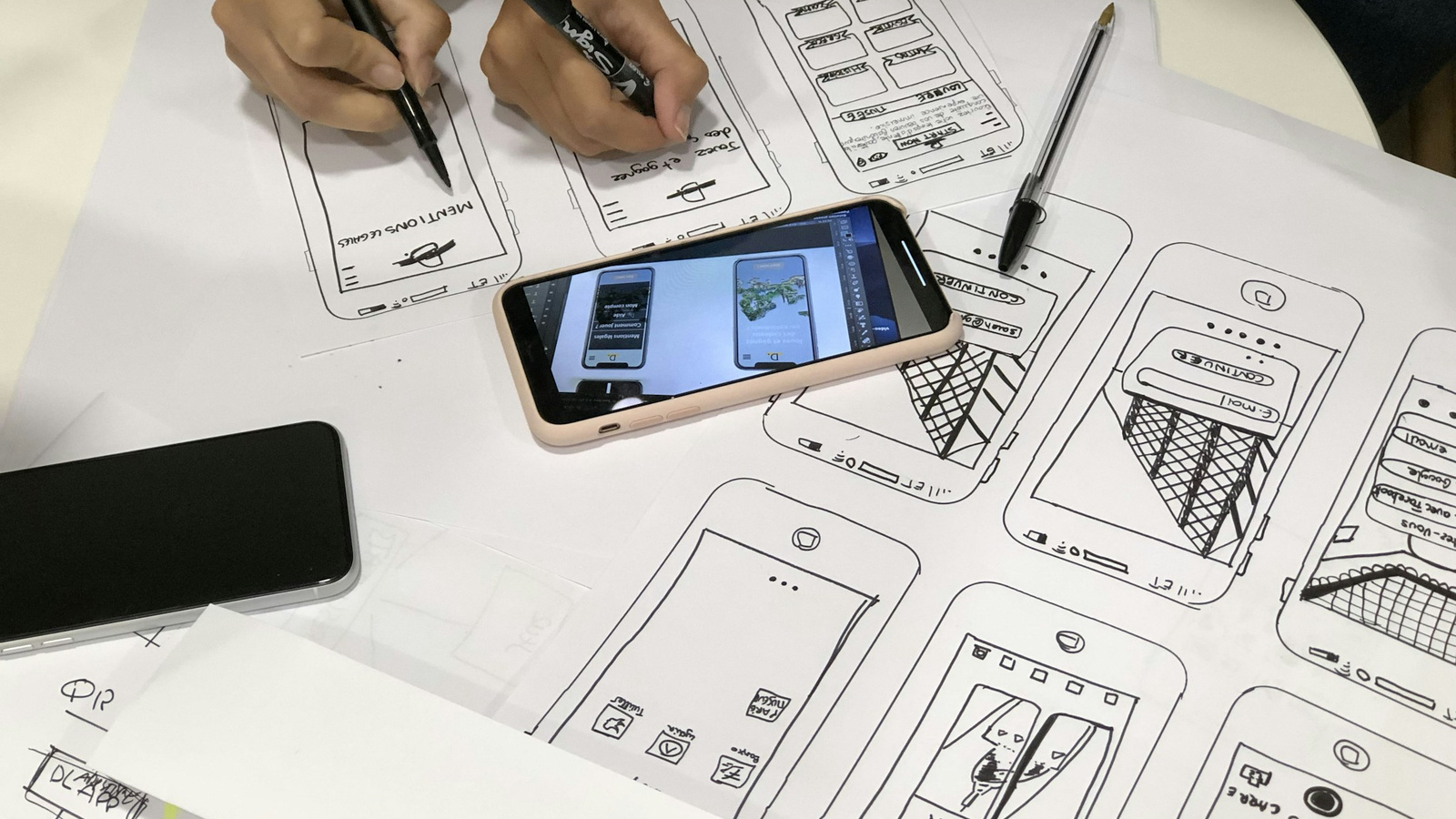
Low-fidelity prototypes make choices visible before they become polished defaults. Credit: Amélie Mourichon / Unsplash.
A prototype answers the question you put into it
Imagine a team building an AI assistant for contract renewals. The initial request is straightforward: generate a dashboard showing customers approaching renewal, a recommended next action and a button to draft an email. Within a short working session, there is an impressive demonstration.
But the dashboard has already made several decisions. It assumes the account manager needs a queue rather than alerts inside an existing CRM. It assumes renewal timing is the primary selection criterion. It assumes an email is the right next action. It assumes the person can judge the recommendation from the information visible on the card.
None of those assumptions becomes more credible because the dashboard is interactive. The prototype can help expose them, but only if the team names them before the demonstration. Otherwise the discussion tends to move toward layout, visual hierarchy and the wording of the email button.
The first discipline is therefore to write the question outside the artifact. “Can an account manager identify which renewal needs attention and explain why?” is a better research question than “Does the dashboard work?” The first allows several possible solutions. The second makes the dashboard itself the center of gravity.
Separate three kinds of uncertainty
I find it useful to distinguish uncertainty about the problem, the interaction and the implementation. They overlap, but they require different evidence.
Problem uncertainty concerns whether the work matters: who encounters the difficulty, in what situation, and with what consequence. Interaction uncertainty concerns whether a proposed behavior helps someone complete that work. Implementation uncertainty concerns whether the system can perform that behavior reliably under real constraints.
A clickable prototype can reduce interaction uncertainty. A technical spike can reduce implementation uncertainty. Neither necessarily establishes that the problem deserves investment. Conversely, interviews might establish a consequential problem without identifying a usable solution.
For the renewal example, discovering that account managers spend time reconciling conflicting dates is problem evidence. Observing whether they can resolve those conflicts in a proposed view is interaction evidence. Checking whether the source systems expose reliable timestamps is implementation evidence. A generated dashboard should not be credited with resolving all three.

Vercel’s design-mode example shows how quickly interface changes become visible. The sample metrics are demonstration content, not product evidence. Credit: Vercel / v0.
The first artifact should be a decision brief
Before asking a tool to produce screens, I would write a short brief with six fields: decision, user situation, current evidence, competing explanations, constraints and disconfirming signal. It can fit on one page. Its usefulness depends on specificity, not completeness.
The decision might be whether to create a new renewal workspace or improve the existing CRM workflow. The situation might be an account manager preparing weekly outreach across accounts with different commercial terms. The evidence might be observed spreadsheet workarounds and support reports, with their limitations recorded.
Competing explanations matter because the same visible symptom can have different causes. A spreadsheet might compensate for missing filtering, unreliable source data, a permissions problem or a reporting obligation. Each explanation suggests a different intervention. Generating a new screen too early can make those explanations disappear from the conversation.
A disconfirming signal states what would make the team change direction. For example: if account managers can already prioritize correctly but cannot trust the renewal dates, a better dashboard is unlikely to address the main obstacle. Write that down before investing in a prototype, when it is still easy to accept an inconvenient answer.
Prototype the disagreement rather than the whole product
When a team is uncertain, generating a complete application feels like progress. It can also bury the question under navigation, sample data and decorative completeness. The smallest useful prototype isolates the disagreement.
Suppose one proposal prioritizes accounts by renewal date and another by unresolved commercial risk. Build two comparable queue views using the same accounts. Keep typography, component quality and data density consistent. Otherwise participants may prefer the more polished option for reasons unrelated to the decision being tested.
A third option might use no new queue at all: add a clear exception indicator to the existing account view. Including this option prevents the exercise from becoming a contest between two versions of the same assumed solution. Sometimes the valuable learning is that an additional destination creates more navigation than benefit.
State what is deliberately absent. If the email-generation feature is simulated, make that clear to stakeholders and research participants at an appropriate point in the study. A prototype can demonstrate a proposed interaction without making claims about model performance, integration readiness or operational reliability.
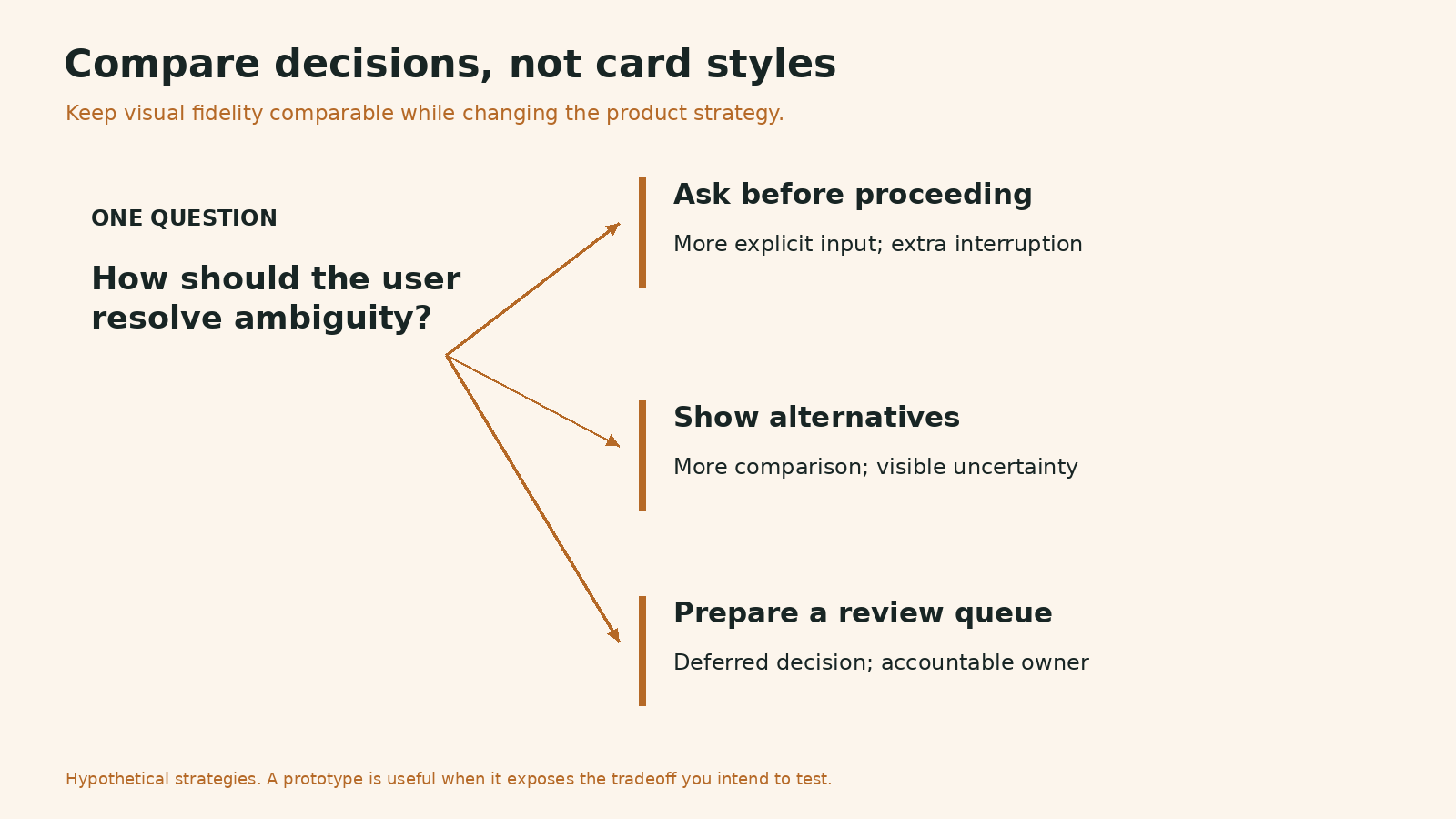
The comparison changes how ambiguity is resolved. It keeps visual polish out of the decision being tested. Credit: Original editorial visual prepared for Andrea Mabellini.
More alternatives do not automatically create more learning
AI makes it easy to produce many visually different alternatives. But three layouts with the same assumptions are not three product strategies. Variation should change a decision-relevant property: where work happens, what information precedes action, how authority is assigned, or whether automation is needed at all.
For a renewal workflow, useful alternatives might be a proactive notification, a task queue and an embedded account checklist. These differ in interruption, ownership and context. Three versions of a dashboard card may differ mainly in style. Both exercises can be legitimate, but they should not be presented as answering the same question.
Name the trade-off for each alternative. Notifications reduce the need to visit a workspace but can create noise. A queue supports planning but adds a destination. An embedded checklist preserves context but may be less useful for cross-account prioritization. The prototype is valuable when it lets people encounter those trade-offs rather than merely admire the screens.
Make generated assumptions visible
Every prototype includes assumptions. AI adds a particular difficulty: it can fill gaps so fluently that the team does not notice anything was missing. A plausible permission model, a sensible default or a confident status label may come from generation rather than product knowledge.
I would keep an assumption register next to the prototype. For each consequential assumption, record where it came from, what happens if it is wrong, and how it will be checked. “The current user can approve an account-level discount” needs a policy answer. “Users understand the term renewal risk” needs a research answer. “The latest contract version is available through an API” needs a technical answer.
This is also the place to distinguish supplied data from invented data. Illustrative accounts are fine for exploration. They become misleading when their distribution makes a design look unusually clear. A table with six tidy records does not establish that the interaction works with long names, incomplete fields, conflicting dates or several hundred items.

Alternatives should expose different decisions. These published sketches illustrate low-fidelity exploration, not the article’s hypothetical product. Credit: Hal Gatewood / Unsplash.
Use realistic difficulty before adding realistic decoration
The fidelity that matters most is often behavioral. Does the prototype contain the ambiguity, interruption and incomplete information found in the actual work? A rough interface with a realistic conflict can teach more than a beautiful interface where every recommendation is obvious.
For the renewal example, include an account with missing dates, one with two contracts and one where the person lacks permission to take the proposed action. Ask participants to explain what they would do. You are testing whether the proposed organization of information supports judgment, not whether people can follow a predetermined sequence of successful clicks.
Include accessibility needs in the question early. Keyboard interaction and understandable status language are part of the experience being evaluated. A prototype that cannot support those interactions may still be useful for a narrow visual exercise, but its limitations must travel with the findings. Do not generalize from a test that excluded an important way of using the product.
Ask for evidence that could change the plan
A demonstration often produces comments. A decision study needs observations connected to a choice. “I like this” is weak evidence for prioritization. A participant consistently overlooking a consequential exception is more useful, particularly when the alternative makes that exception visible.
Write the observation before the interpretation. “The participant opened three accounts to compare dates” is an observation. “The queue lacks enough context” is an interpretation. “Add a comparison view” is a possible solution. Keeping them separate prevents a preference from being promoted into a finding and a finding from being reduced to a single feature request.
Before sessions, agree how the team will use the results. What would support the current direction? What would justify another round? What would stop implementation? The criteria need not be statistical thresholds for a qualitative study. They should explain what decision the evidence is expected to inform and what uncertainty will remain afterward.
Give reviews a decision agenda
The most effective prototype review starts with the question and ends with a recorded decision. I would show the user situation, the unresolved trade-off and the relevant evidence before opening the artifact. This makes the screens serve the conversation.
Ask reviewers to separate defects from direction changes. A confusing label may be corrected within the current concept. A missing source of authority may require the concept to change. Mixing both into a long list of feedback makes cosmetic improvements appear to resolve strategic uncertainty.
End with one of four outcomes: continue, revise, investigate or stop. Attach an owner and a reason. A prototype that exposes a bad assumption and stops a project has done useful work. Without an explicit stop outcome, teams tend to interpret every review as permission to generate another version.

Penpot makes the interaction connection and its settings visible. Published prototype example. Credit: Penpot.
What recent research can and cannot tell us
Nielsen Norman Group’s evaluation of AI prototyping tools found that detailed requirements improved outputs, while contextual and interaction nuances still needed designer judgment. Its scenarios are a useful warning against equating generated fidelity with resolved design. They do not establish a universal failure rate or a ranking that applies to every tool and product. See the linked evaluation and methodology for its scope.
My recommendation goes beyond that evaluation: make the decision brief a prerequisite for consequential prototyping. This is an operating practice, not a finding from the study. It is intended to preserve context when interface production becomes easier and more people can create convincing artifacts.
Likewise, tool adoption is not evidence of product effectiveness. A survey describing designers’ workflows can indicate where practice is changing. It cannot show that a particular generated prototype improved a customer outcome. Keep those claims separate when presenting AI-related progress to leadership.
Measure progress through decisions, not output volume
Counting prototypes rewards production. Counting decisions without assessing their quality can reward premature closure. I would review a small set of concrete questions: which uncertainty was reduced, which assumption changed, which direction was rejected, and what evidence now supports the next investment?
For an internal pilot, compare the whole cycle from question to reviewed decision. Include prompt preparation, correcting generated behavior, recruitment, analysis and technical review. Measuring only generation time can make a workflow look efficient while moving effort into less visible activities.
Also inspect rework. Did implementation reveal a policy that the prototype invented? Did testing uncover that the task belonged in another product? These are signals about the decision process, not reasons to abandon rapid prototyping. They show where the team needs better context before generating the next artifact.
A practical session for the next prototype
Start with a short cross-functional session. Product names the investment decision. Research or design states the user situation and evidence. Engineering identifies the dependency that could invalidate the concept. Together, name one alternative and one signal that would change the direction.
Then choose the smallest artifact that can investigate that signal. It may be a coded prototype, a paper sequence, a dataset comparison or a policy walkthrough. AI can accelerate production when production is the bottleneck. It should not determine the method merely because it is available.
After testing, revisit the original brief. Replace assumptions with evidence only where the evidence supports that move. Carry unresolved questions into the next stage. For the implementation boundary, see my related article on connecting design-system context to code; tool integration helps preserve rules, but the team still owns the decision to build.
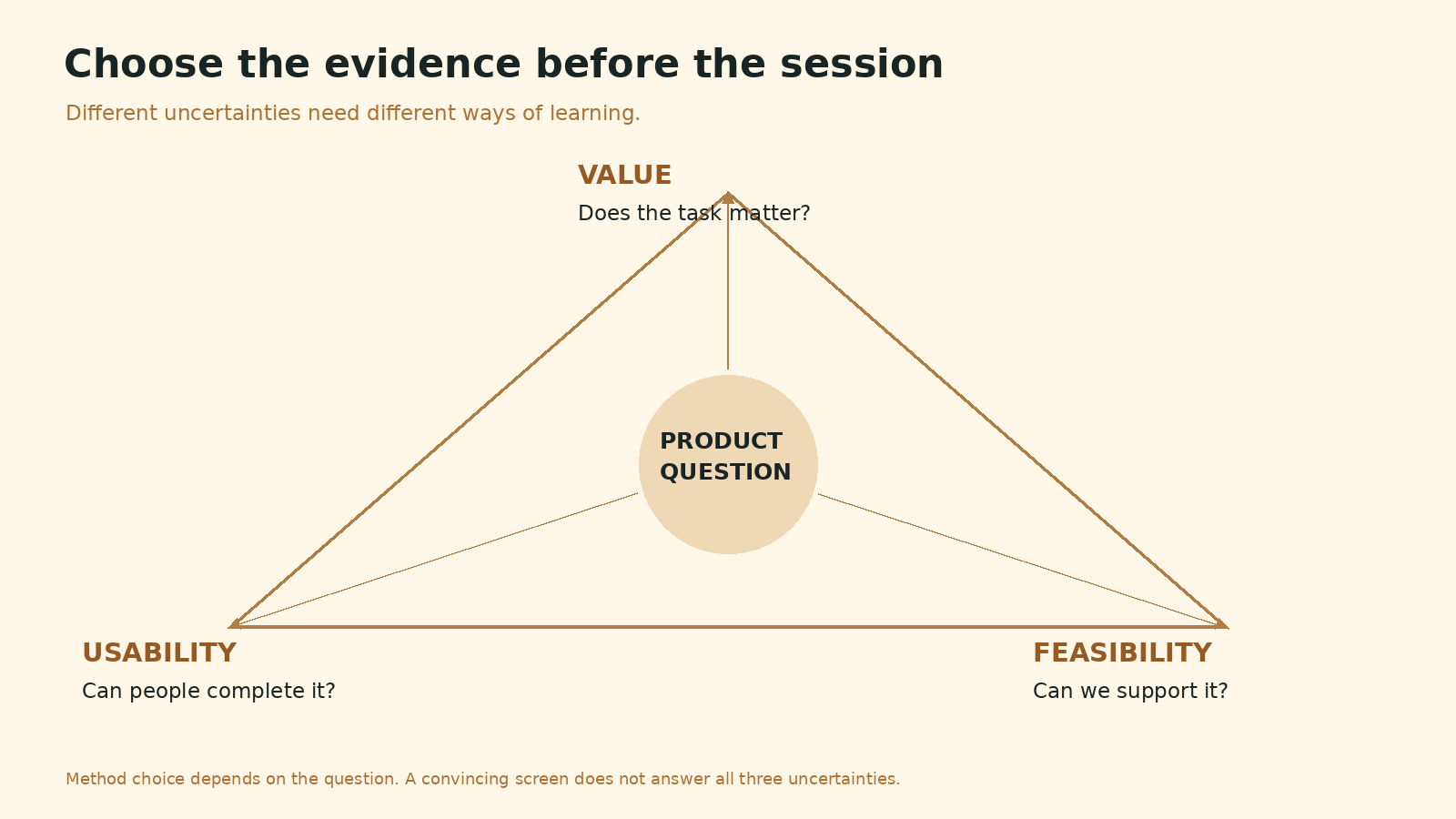
Use the session to answer a bounded question. Interface fidelity does not substitute for the appropriate evidence. Credit: Original editorial visual prepared for Andrea Mabellini.
The value of speed depends on what it makes possible
Faster prototyping can create time for more realistic testing, earlier engineering collaboration and a serious comparison of alternatives. It can also create pressure to treat the first plausible answer as finished. The tool does not choose between those outcomes. The team’s working process does.
The standard I would use is simple: can we explain what this prototype taught us that we did not know before, and why that learning changes the next decision? If the answer concerns only visual polish, the artifact may still be useful, but the product question remains open.
An effective AI-assisted designer is not the person who produces the greatest number of screens. It is the person who uses cheaper production to make expensive assumptions visible before the organization commits to them.