For years, “handoff” described a specific moment in product development. Design reached sufficient fidelity, engineering received the specifications, and implementation began.
That model was never as clean as the word suggested. Good teams already worked back and forth. Engineers challenged interaction ideas. Designers reviewed builds. Product requirements changed. Edge cases appeared in code that had never appeared in Figma.
AI is now making the fiction of a clean handoff even harder to maintain.
A designer can move from a prompt to a functional prototype in Figma Make, Claude Code, v0, Lovable or another code-generating environment. That prototype may contain real components, data, responsive behavior and interactions. It can be tested with users and, with surprisingly little ceremony, parts of it can find their way into a production repository.
The question is no longer simply: how do we hand a design to engineering? The more useful question is: what must a team preserve when the artifact can cross from design into implementation before the traditional handoff has even happened?
The prototype is changing category
A prototype used to be easy to classify. It was a representation of intended behavior. It could be high fidelity, animated and convincing, but everyone understood that it was disposable.
Code-generating design tools blur that boundary. UX Tools’ 2026 State of Prototyping survey shows how deeply AI tools have entered designers’ weekly stack: Claude, ChatGPT, Claude Code and Figma Make now sit alongside Figma itself. More important than any ranking is the behavior behind it. Designers increasingly work in environments where an idea can become an interactive coded artifact during exploration, not after it.
That changes the risk profile. A Figma frame can contain a misleading interaction, but it cannot accidentally introduce a dependency, expose a secret, create an inaccessible DOM structure or establish a component pattern that gets copied across a codebase. A coded prototype can.
At the same time, treating every generated prototype as disposable wastes one of the biggest benefits of the new workflow. If the artifact already expresses useful behavior, uses the real component library and passes engineering review, rebuilding it from screenshots is not inherently more professional.
The right response is not “designers should never ship code” or “handoff is dead.” It is to redefine what handoff is protecting.
Handoff was never about pixels
Traditional handoff artifacts emphasize visible specifications: dimensions, spacing, colors, assets, component names and responsive rules. Those details matter, but they are not the most valuable information a designer gives an engineer.
The higher-value information is usually invisible: why the flow is structured this way; which user problem is being solved; which requirements are fixed; which states are critical; what evidence supports the design; where accessibility or regulatory constraints apply; which compromises were deliberate; and what should happen when the happy path fails.
AI can reproduce visible structure increasingly well. It is much less reliable at reconstructing intent that was never made explicit. The new handoff should therefore move away from “here are the screens” and toward “here is the interaction contract.”
1. Handoff intent, not just output
Imagine a designer generates a working renewal flow for an enterprise SaaS product. The prototype has a customer summary, pricing table, approval step and final send action. An engineer can inspect the code and understand what is rendered. What they cannot necessarily infer is why sending requires a second approval, why one field is read-only, why a warning persists, or why the pricing table remains dense on desktop.
Those decisions may come from research, permissions, commercial policy or compliance. If that reasoning stays in a meeting or in the designer’s head, the code becomes an incomplete specification no matter how functional it looks.
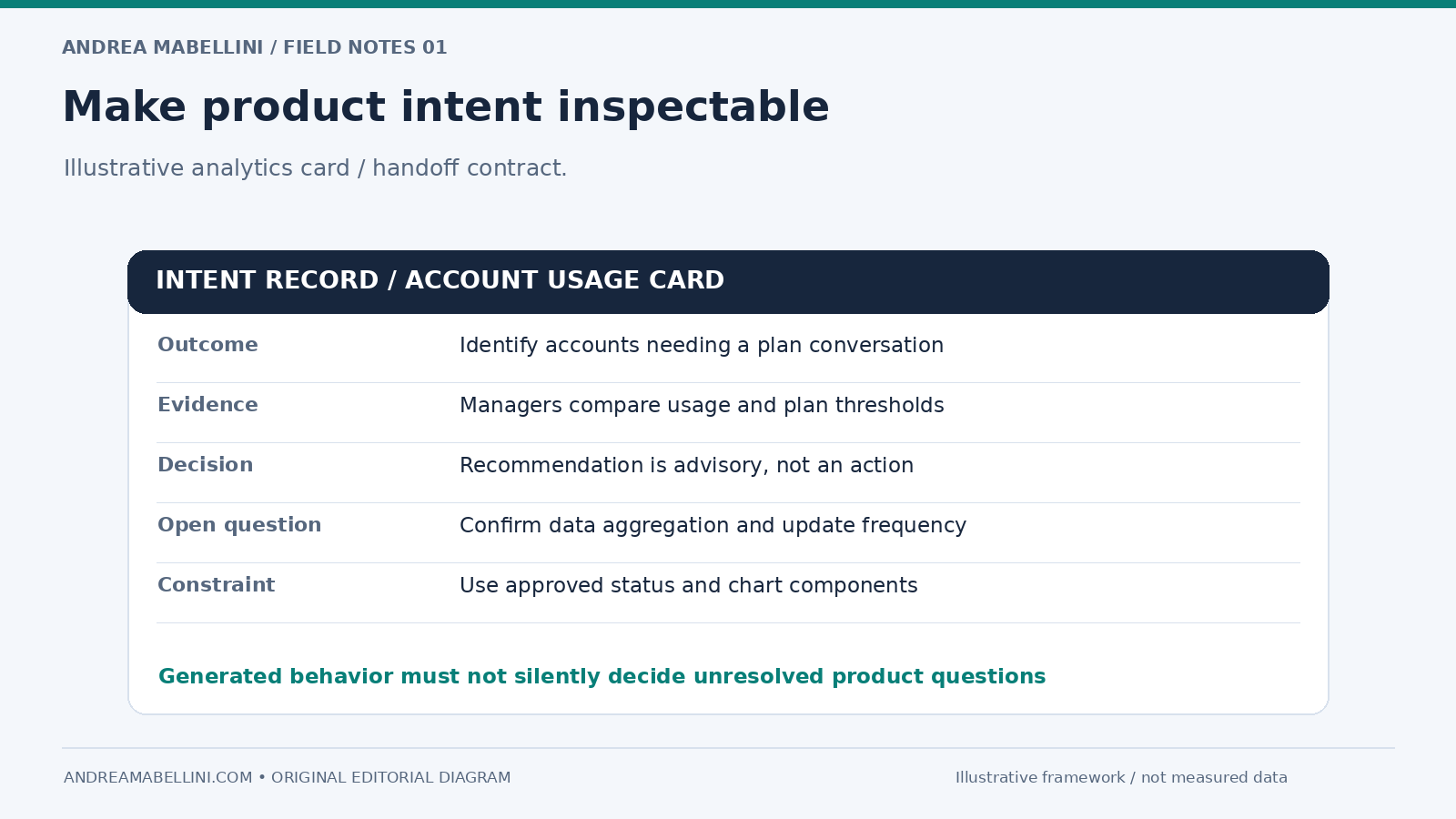
I would attach a short intent layer to any AI-generated prototype that might survive into implementation: Goal, Critical decisions, Evidence, Open questions, and Constraints. This does not need to become a twenty-page specification. Five precise bullets can be more useful than fifty redlines.
2. Separate prototype code from production claims
The most dangerous sentence in an AI-assisted workflow is: “It already works.” Working is not a binary property.
A generated prototype may work with one dataset, in one browser, at one viewport, for one permission level, with a happy network connection. Production software has to survive everything around that demonstration.
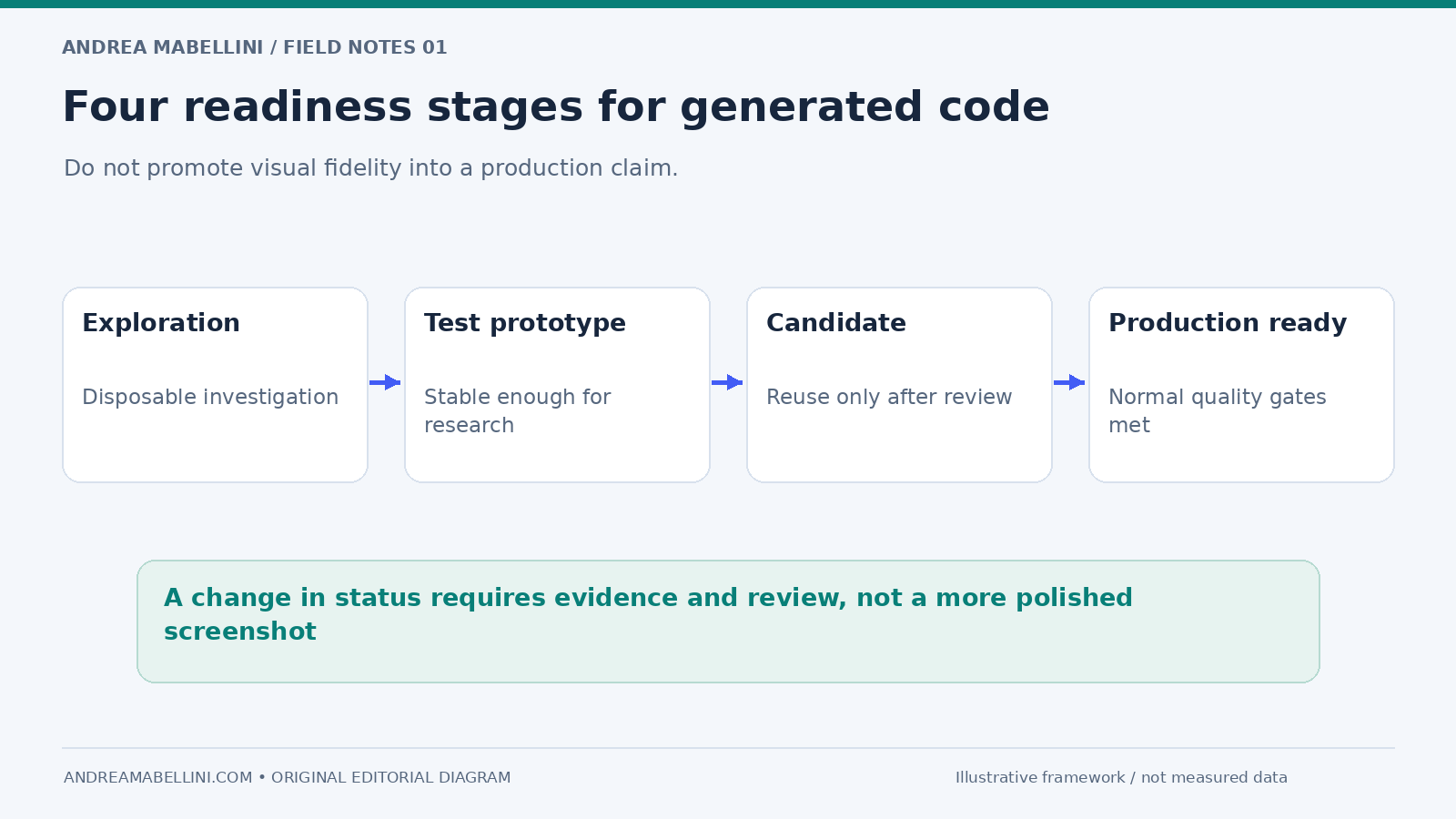
Teams need a visible status for generated code. I would use four stages: Exploration for disposable code; Test prototype for something stable enough for research; Implementation candidate for code that might be reused after review; and Production-ready only after normal technical quality gates.
The point is not bureaucracy. It is to stop visual polish from being mistaken for technical maturity. A beautiful prototype can be architecturally poor. An ugly prototype can contain an excellent interaction model.
3. Make the design system the shared boundary
The most promising design-to-code workflows are not the ones that generate the most code. They are the ones that reduce invention.
If an AI tool can see the real design system, component implementation, variables and usage rules, it has less freedom to fabricate a parallel product language. This is the practical value of workflows such as Figma MCP and Code Connect: structured context and mappings replace some of the guesswork involved in inferring a system from pixels.
But access to components is not enough. A system needs semantic rules. When should an Alert be used instead of inline validation? Which button variant represents a destructive action? Which component owns focus after a modal closes? Can a card become clickable if it already contains interactive controls?
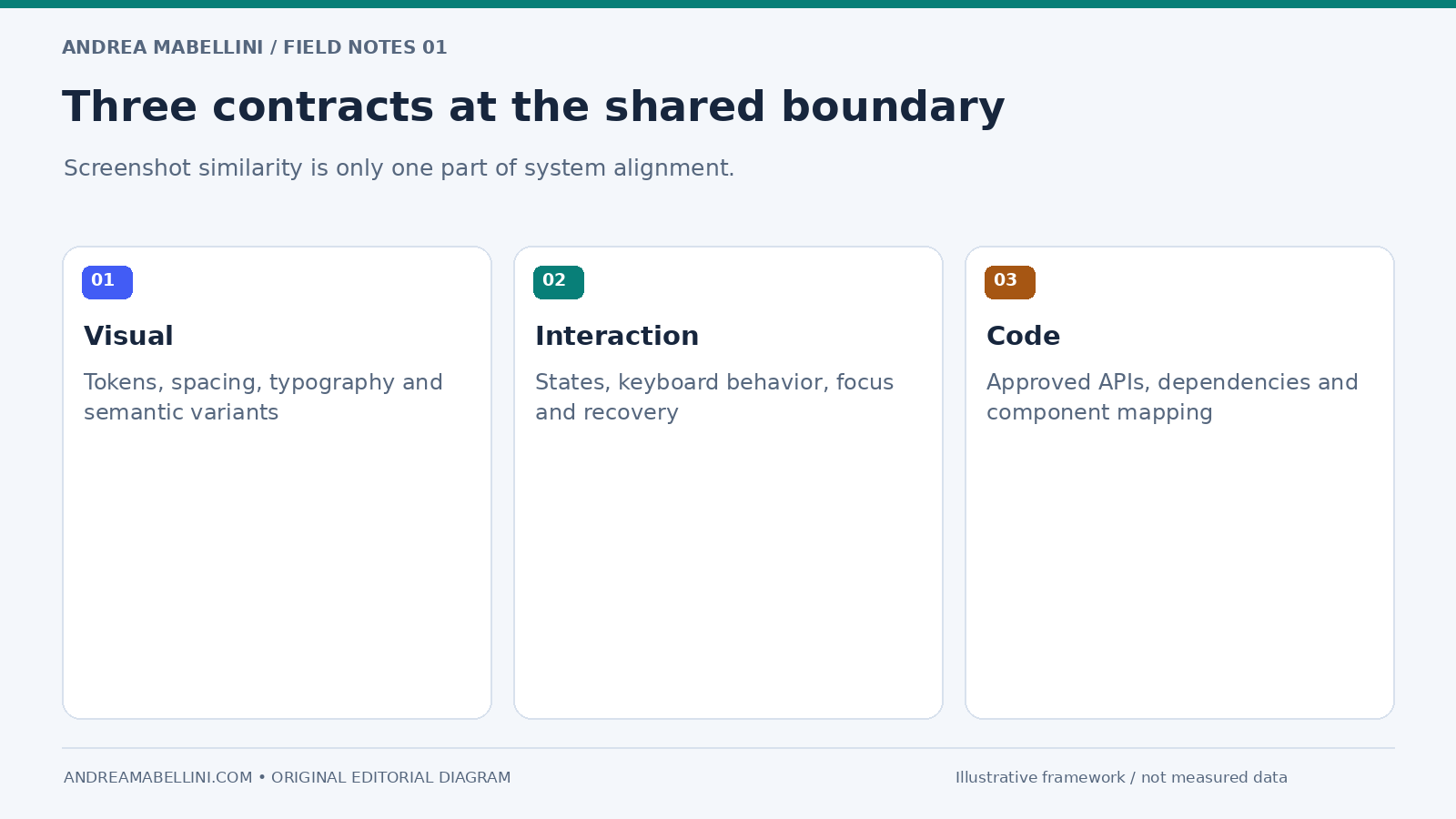
I would treat the design system as a contract with three layers: a visual contract for tokens and appearance; an interaction contract for behavior, states and accessibility; and a code contract for approved components, APIs and implementation patterns. If generated output violates one of those layers, it is not close enough simply because the screenshot matches.
4. Review diffs, not screenshots
Designers are trained to review rendered outcomes. Engineers are trained to review changes. AI-assisted product work needs both.
A screenshot answers: does this look and behave like the intended experience? A code diff answers: what did this change introduce into the system? Those are different questions.
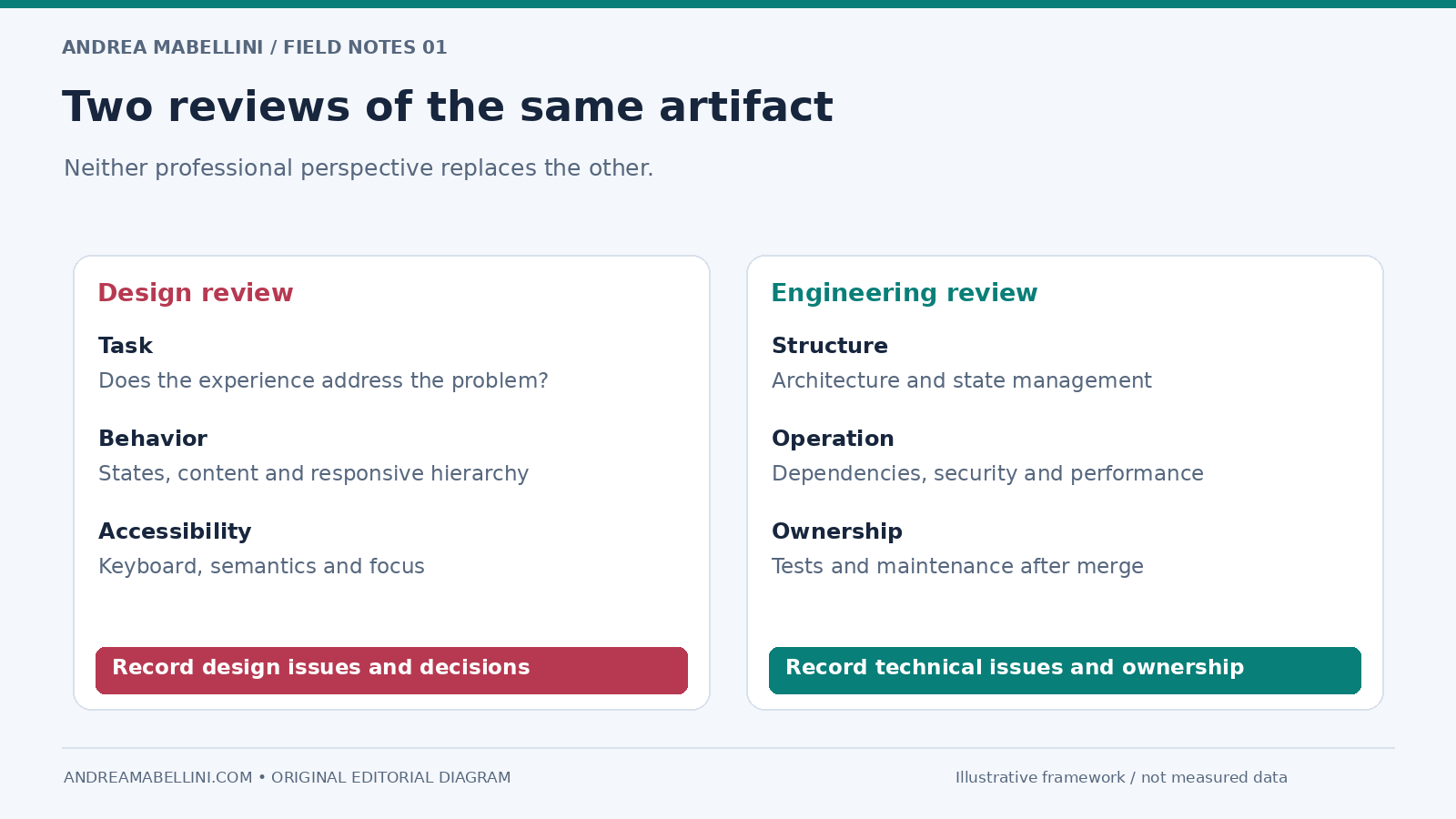
When a coded prototype becomes an implementation candidate, run a dual review. The design review checks hierarchy, interaction states, responsive behavior, content, accessibility, system consistency and whether the result still solves the original problem. The engineering review checks architecture, dependencies, state management, security, performance, testing and maintainability.
Neither review replaces the other. The valuable shift is not that one discipline can bypass another. It is that the artifact can become richer earlier, allowing design and engineering to review the same thing from different professional perspectives.
5. Move accessibility earlier because code exists earlier
A coded prototype creates an opportunity that visual prototyping often misses: accessibility can be inspected before formal implementation. Keyboard order, semantic elements, labels, focus behavior, live regions and responsive reflow can be evaluated in something closer to the real medium.
That is useful only if teams resist a common trap: assuming generated code is accessible because it uses familiar-looking components. AI can produce a button-shaped div, a modal that mishandles focus, color-only status communication, or labels that are visually present but not programmatically associated with inputs.
The workflow should therefore include accessibility checks at the moment the prototype becomes interactive, not at the end of development. Faster generation can improve quality because the team gets a testable artifact sooner, but only if review moves sooner too.
6. Treat generated code as a dependency you must understand
Generated code can introduce packages, patterns and behavior that nobody explicitly selected. A designer may ask for a date picker and receive a library dependency. A generated authentication flow may store state in a way that is inappropriate for the product. A seemingly harmless image workflow may create a privacy or security issue.
An autonomous development agent may optimize for completing a task without understanding the organization’s operational boundaries. Teams should inspect its actions rather than treating completion as approval. The design lesson is not to become a security engineer. It is to recognize that a functional artifact has operational consequences.
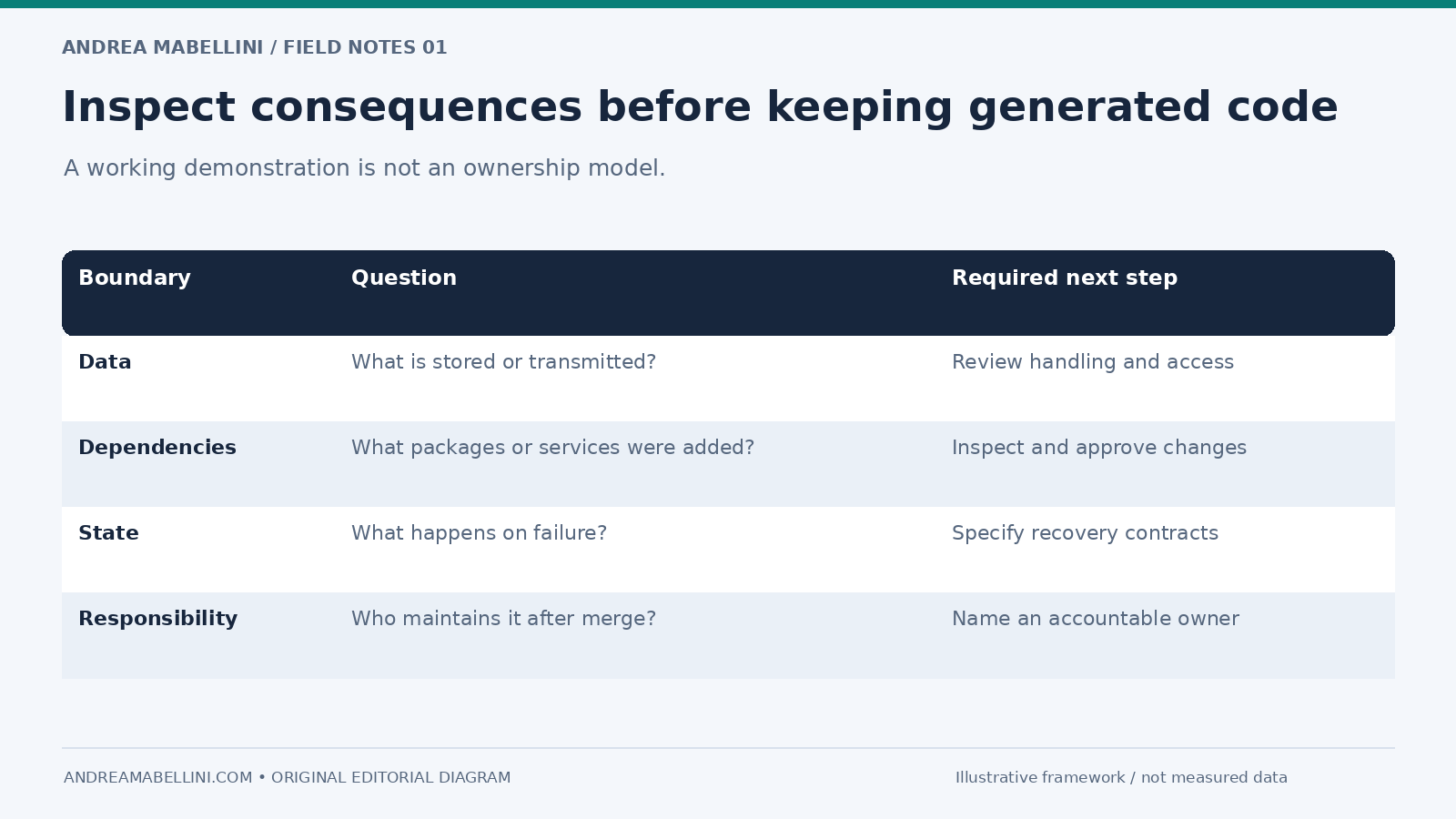
Before generated prototype code is reused, someone must be able to answer: What dependencies were introduced? What external services does it call? What data does it store or transmit? Which assumptions were generated rather than specified? What happens on failure? Who owns the code after merge?
“The AI wrote it” is not an ownership model.
7. Replace the handoff meeting with a readiness review
I would not remove the cross-functional meeting that often sits around handoff. I would change its purpose.
Instead of presenting completed screens to engineers, run a short implementation-readiness review around the artifact. Cover the outcome, evidence, interaction contract, system fit, code status, risks and ownership. Modern tools can expose spacing. Teams need conversation for decisions.
A concrete example: an AI-generated analytics card
Suppose a product designer is working on an enterprise analytics dashboard. They need a new card showing a customer’s usage trend, current plan threshold and a recommendation when usage approaches the limit.
With an AI prototyping tool, the designer can generate a working version using the existing card, chart, badge and button components. They connect mock data and add responsive behavior. Within an hour, the team can interact with something that previously might have required a separate front-end spike.
The old handoff might have consisted of a Figma frame plus annotations. The new handoff should capture more.
Intent: the card is primarily a decision-support surface, not a reporting widget. The user needs to notice accounts likely to require a plan conversation.
Evidence: account managers currently export usage data and manually compare it with plan thresholds.
Interaction contract: warning state begins at the agreed threshold; the recommendation is advisory; the user can inspect the underlying usage period before acting.
System constraint: use existing Card, Status Badge and chart primitives; do not create a new warning color.
Prototype status: the generated chart implementation is exploratory. The existing production chart package must be used before merge.
Accessibility: the trend cannot be communicated only by line color; the warning state needs text; chart data needs an accessible alternative.
Engineering review: replace mock data, verify loading and error states, confirm aggregation logic, add tests and inspect performance with the real dataset.
The coded prototype reduced ambiguity around behavior, but it did not remove the need for collaboration. It made the collaboration more concrete.
What designers should learn now
I do not think every product designer needs to become a production engineer. I do think implementation literacy is becoming much more valuable.
A designer working with AI-generated code should understand component structure, responsive layout, state, tokens, basic accessibility semantics and the difference between a local prototype and a maintainable system. They should be able to inspect a repository without panicking, understand what a pull request changes at a high level and have a useful conversation about trade-offs.
The purpose is not to replace engineering expertise. It is the same reason a strong designer understands research without necessarily being a dedicated researcher, or understands product metrics without being a data analyst. Cross-functional literacy improves decisions.
Design leaders should make room for that learning rather than treating code as a forbidden boundary. At the same time, they should resist turning “designer who can generate code” into a shortcut for reducing quality gates or collapsing multiple roles into one overloaded person.
What engineering should get from design
If designers provide more executable artifacts, engineering should expect less pixel annotation and more product reasoning.
The best handoff package in this new model may be surprisingly small: the working artifact; relevant design-system references; a short interaction contract; known states and edge cases; evidence and open assumptions; and a clear statement of what generated code is safe to keep versus replace.
This is a better use of design time than documenting information already encoded in the artifact.
What product managers should stop doing
AI prototypes make it dangerously easy to interpret visible progress as validated progress. A stakeholder sees a working application on Tuesday and asks why it cannot ship on Friday.
The product manager has an important role in protecting the difference between three questions: Can we demonstrate it? Does it solve the right problem? Can we responsibly operate it in production?
AI compresses the first question dramatically. It may help with the second by making testing faster. It does not automatically answer the third. That distinction should become part of planning, estimation and stakeholder communication.
The real shift: from artifact handoff to responsibility handoff
For a long time, teams treated design and code as different artifacts connected by a handoff. AI is making the artifact boundary porous. Design can contain code. Code can be generated from design context. A prototype can become a branch. A design-system component can exist simultaneously as a Figma object, coded implementation and machine-readable context for an agent.
When the artifact boundary weakens, responsibility becomes the more important boundary. Who decided this behavior? What evidence supports it? Who reviewed the implementation? Which system rule applies? Who accepts the risk? Who maintains it after launch?
Those questions are not signs that the new tools have failed. They are signs that the tools are becoming consequential.
A practical readiness checklist
- Is the user outcome explicit?
- Are critical interaction decisions documented?
- Can we distinguish validated evidence from generated assumptions?
- Does the artifact use the real design system where appropriate?
- Have empty, loading, error, permission and recovery states been considered?
- Has the rendered experience been reviewed at realistic viewports?
- Has accessibility been checked in the interactive artifact?
- Has engineering reviewed architecture, dependencies, security and maintainability?
- Do we know which generated code is disposable and which is an implementation candidate?
- Is ownership clear after merge?
If the team cannot answer those questions, the problem is not that AI moved too quickly. The problem is that the review model did not move with it.
Handoff is not disappearing. It is becoming more senior.
The old version of handoff could become procedural: export assets, inspect spacing, annotate behavior, answer implementation questions. Much of that mechanical work can now be automated or made directly inspectable.
What remains is harder. Designers need to communicate intent. Engineers need to evaluate generated implementation rather than assume a clean rewrite. Design-system teams need to provide rules that machines and humans can both apply. Product managers need to separate prototype velocity from production readiness. Leaders need to define where accountability sits when artifacts move across disciplines faster than the organization is used to.
That is not the death of handoff. It is handoff growing up from a file-transfer ritual into a shared quality gate.
And for product designers, that is a good trade: less time explaining pixels that tools can already inspect, more time explaining the decisions that actually make the product work.
For related implementation context, see my guide to connecting a Figma design system to code. For the surrounding leadership work, see the invisible work of a UX lead.