Trust is becoming one of the most abused words in AI design. Teams add friendly language, an avatar, an “AI may make mistakes” disclaimer and call the experience trustworthy.
That is surface treatment.
In an agentic product, trust comes from whether the user can understand and control consequential behavior. The interface must make intent, authority, evidence, uncertainty and recovery visible at the right moments.
1. Show what the agent thinks the user asked for
Before action, summarize interpreted intent in plain language. The higher the consequence, the more specific the summary should be.
Bad: “Ready to continue?”
Better: “I’ll update the renewal date for these 14 contracts and notify their owners. No customer emails will be sent.”
2. Separate proposal from execution
Users should know whether an agent is suggesting, drafting or acting.
These states deserve distinct visual treatment. A draft email should not look identical to a sent email. A proposed plan should not look identical to an action log.
3. Make permission boundaries understandable
Technical permissions are not enough. Users need semantic boundaries.
- May read customer records.
- May draft changes.
- May not delete records.
- Must ask before sending external communication.
Whenever possible, express these as controls the user can inspect and change.
4. Design approvals around risk
Not every action should require approval. Approval fatigue trains users to click without reading.
Classify actions by consequence:
- low risk and reversible;
- medium risk;
- high risk;
- irreversible or externally visible.
Reserve strong interruption for the latter categories.
5. Expose assumptions that change the outcome
If the agent had to assume currency, date range, customer identity, policy version or audience, show it.
Do not expose every internal uncertainty. Expose assumptions the user can meaningfully correct.
6. Build a human-readable action log
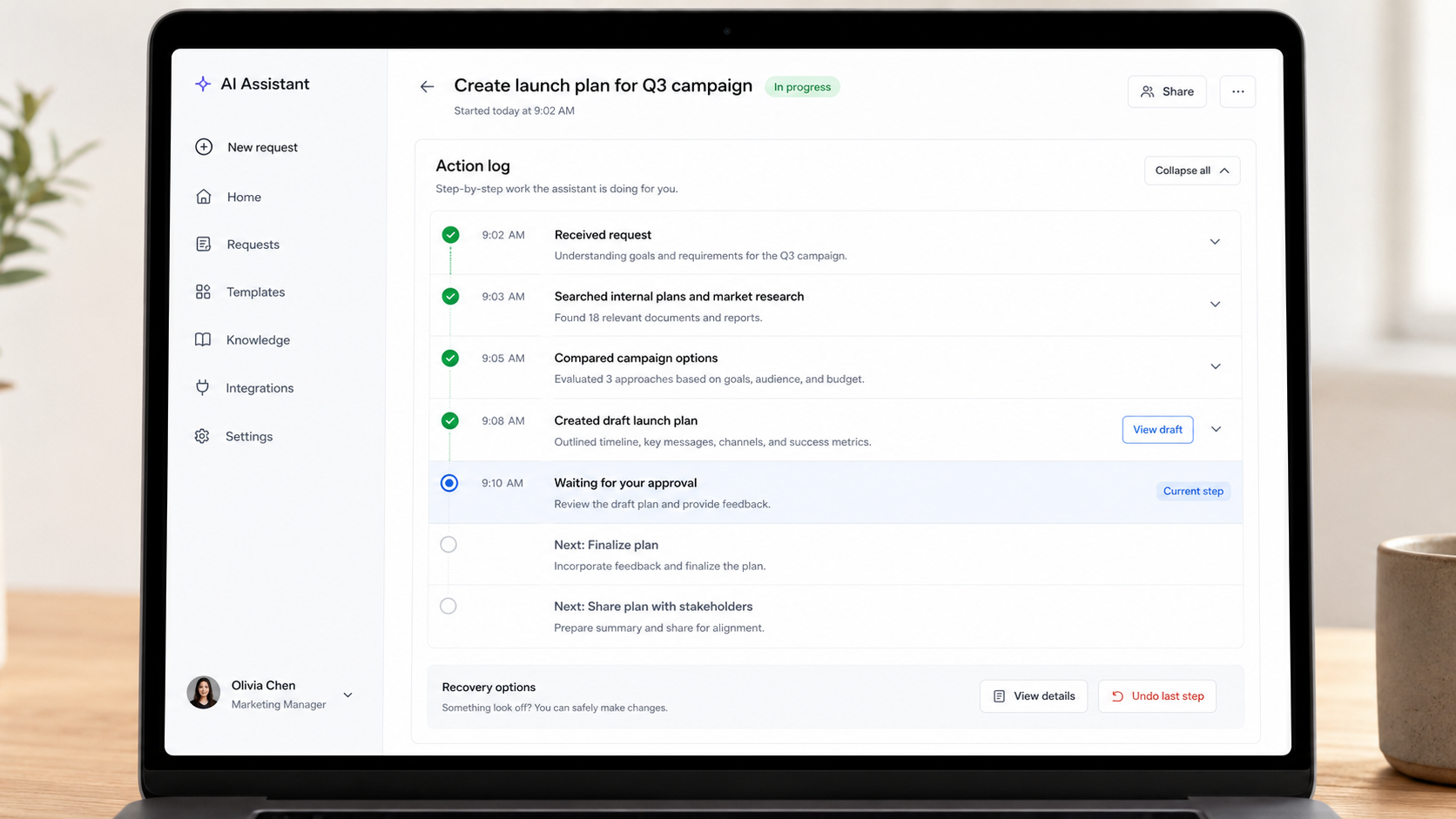
Trust grows when people can answer “what happened?”
A useful log might show:
- searched pricing database;
- found three matching plans;
- selected plan based on requested region;
- created proposal draft;
- waiting for approval.
A useless log shows tool calls and internal system names.
7. Make sources inspectable
When a recommendation depends on data, let the user see the source.
This does not require dumping every document into the interface. Provide enough provenance to answer: where did this information come from, how recent is it, and can I inspect it?
8. Give uncertainty a behavior, not just a label
“AI can make mistakes” is not a recovery strategy.
If uncertainty is high, the product should change behavior: ask a clarifying question, narrow the action, request approval, show alternatives, or stop.
Trustworthy systems react to uncertainty.
9. Design reversibility before launch
For each agent action, ask:
- Can it be undone?
- How long is undo available?
- What side effects remain?
- Can the original state be reconstructed?
Build recovery into the workflow rather than writing an apology after failure.
10. Make handoff a first-class state
If the agent cannot continue, it should transfer context, not merely fail.
The human recipient should receive the goal, completed steps, evidence, unresolved issue and suggested next action.
11. Let users inspect active context
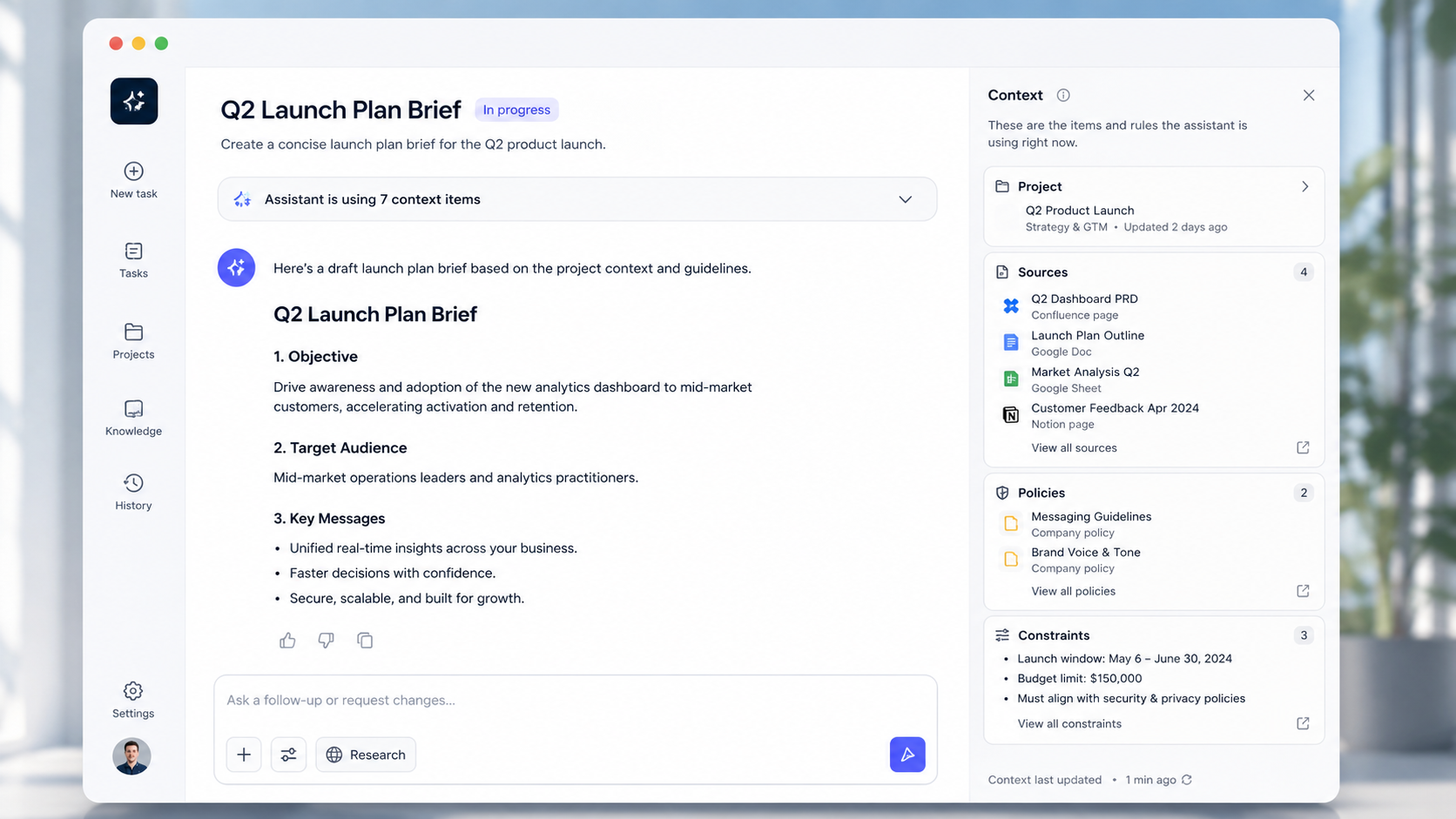
Show the project, files, policies or systems currently informing the agent. Context mistakes are often experienced as intelligence failures.
12. Test trust with behavior
Do not only ask “Do you trust the AI?”
Observe:
- Do users review before approval?
- Do they understand what will happen?
- Can they predict when the agent will ask?
- Do they know how to recover?
- Do they correctly identify which actions already occurred?
Trust is demonstrated through calibrated use, not positive sentiment alone.
The checklist
Before shipping an agentic workflow, verify:
- Intent is visible.
- Plan is inspectable.
- Delegation level is clear.
- Boundaries are explicit.
- High-risk actions require appropriate approval.
- Important assumptions are exposed.
- Sources can be inspected.
- Uncertainty changes system behavior.
- Actions are logged in human language.
- Reversible actions can actually be reversed.
- Irreversible actions are identified before execution.
- Human handoff includes context.
- Notifications focus on exceptions and approvals.
Trust is an interaction architecture
A trustworthy agent does not need to look human. It needs to behave legibly.
People should understand what it is doing, why it is doing it, what authority it has, where it is uncertain and what happens if it is wrong.
That is not branding.
That is UX.
A practical trust review for one agent workflow
Take a single task the agent performs and draw it as a sequence. Under every step, add five questions: what does the agent know, what does it assume, what can it change, what can the user see, and what happens if it is wrong?
This simple exercise reveals invisible trust gaps very quickly.
Example: an AI travel agent
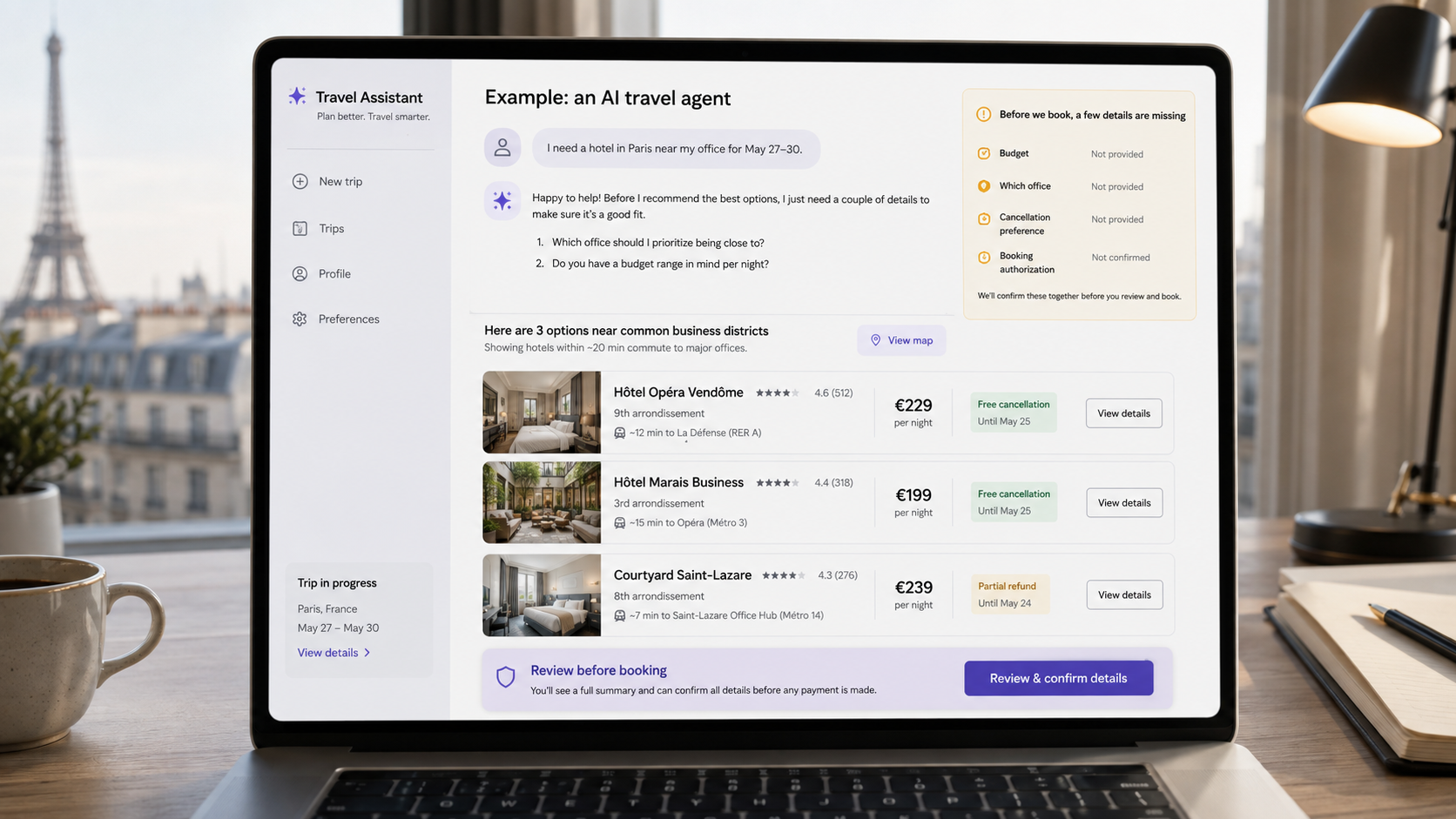
A user says, “Book me a hotel in Paris near the office for next Tuesday.” The agent can potentially search, compare, select and pay.
A trustworthy design should surface missing constraints before purchase: which office, budget, cancellation needs, loyalty preference and whether booking is actually authorized.
The agent can autonomously perform low-risk exploration: search hotels, compare travel times, check cancellation policies. It should move into an approval state before an expensive external commitment.
The approval screen should summarize the choice, price, cancellation terms, dates, guest and payment method. The user should not have to reconstruct those facts from chat history.
Example: an AI design-system maintainer
An internal agent finds 86 detached button instances and offers to replace them with the official component.
The correct UX is not a cheerful “Fix all” button.
Show scope, affected files/pages, exceptions, expected visual differences and whether the change is reversible. Let the designer preview a sample before applying it broadly.
The same trust architecture applies even though no money is involved. The consequence is system-wide change.
Trust calibration matters more than maximum trust
The goal is not to make users trust the system as much as possible. Over-trust is dangerous.
The goal is calibrated trust: users rely on the agent when it is capable and verify it when uncertainty or consequence is high.
Good interfaces therefore sometimes reduce confidence deliberately by exposing missing context or asking for review.
Design the approval moment
Approvals should contain only decision-relevant information.
A good approval card answers:
- What will happen?
- Who or what is affected?
- What is the irreversible part?
- Which source or rule drove the decision?
- What can I edit before approving?
If the user must read the full conversation to answer those questions, the approval pattern has failed.
Design the post-action state
After execution, clearly separate completed actions from planned actions. Show outcome, relevant identifiers and recovery options.
For example: “Proposal sent to Maya Chen and Lukas Weber at 14:06. View email. Create correction. Undo scheduled follow-up.”
Do not merely say “Done.”
Design errors around recovery
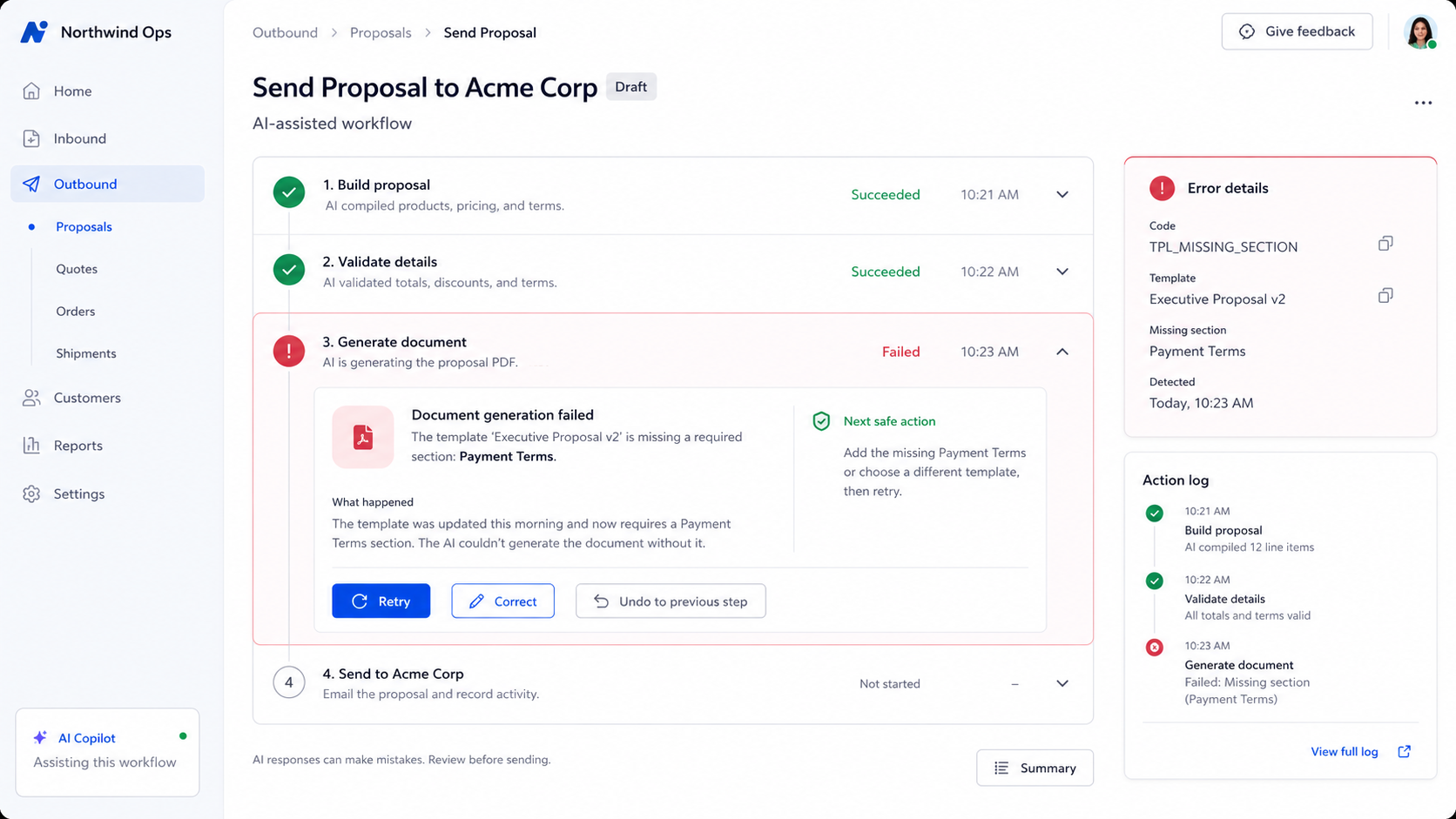
An error message like “Something went wrong” is especially weak when an agent has already completed several steps.
A better error state explains what succeeded, what failed, whether anything external happened and what the next safe action is.
Testing trust with scenarios
Include deliberate failures in usability testing:
- ambiguous customer name;
- conflicting source data;
- permission denied halfway through;
- price changes before purchase;
- agent recommends something contrary to user preference;
- external tool becomes unavailable.
Observe whether users understand the state and recover appropriately.
Metrics worth tracking
Agentic products need behavioral trust metrics, for example:
- approval reversal rate;
- frequency of users opening source details;
- percentage of automated actions later undone;
- clarification frequency;
- handoff success rate;
- rate of users expanding delegation after repeated successful use;
- errors caused by misunderstood intent.
These metrics are more informative than a generic trust score.
Trust patterns belong in the design system
If several teams build agent features, centralize the interaction contracts. Define what “pending approval” means, how sources are shown, what an action log contains and how delegation levels are expressed.
Consistency itself creates trust because users learn how the product behaves across contexts.
The final question
Before shipping, ask a user who has never seen the feature: “What is the agent allowed to do right now?”
If the answer is wrong, no amount of polished AI branding will fix the underlying UX.
Making trust a team habit, not a checklist

Trust patterns are easy to document and hard to practice under deadline pressure. The real test is whether they survive the product sprint.
Start with one agent workflow. Map every step and run it through the trust checklist. Find the first gap — an approval that skips context, a log that nobody reads, an error that offers no recovery — and fix it before the feature ships.
Then build team muscle around the review itself. Define who asks the trust questions. Make it part of design critique, not a last-minute QA pass. The earlier these conversations happen, the less expensive the fixes.
Document what works. When a pattern reliably creates clarity — a specific approval card layout, a particular way of surfacing assumptions, a delegation control that users actually configure — write it down and add it to your design system. Trust at scale comes from consistency, not heroics.
The teams that build genuinely trustworthy agentic products are not the ones with the most sophisticated AI. They are the ones that make agent behavior legible to every person who touches the product — from the user who approves a workflow to the engineer who debugs a failure.
That is the habit worth building.